
Executive Overview
In a strategic evolution that marks a major departure from its long-standing hardware philosophy, Amazon has introduced an entirely new line of tablets operating on Android 16 and featuring native, uncompromised access to the Google Play Store. Historically, Amazon’s tablet ecosystem—anchored by FireOS and constrained to the proprietary Amazon App Store—occupied a distinct niche in the consumer electronics market. While budget-friendly and optimized for Prime content consumption, the legacy Fire tablet lineup often drew criticism for its limited mainstream application support and closed ecosystem.
The launch of the new Amazon Alexa Tablet series shatters that paradigm. Driven by Android 16 and full Google Mobile Services (GMS), these devices bridge the gap between open-platform versatility and deep Amazon integration. Among the headline features accompanying this hardware rollout is Kindle Mode, a specialized contextual environment engineered to transform a standard, notification-heavy multi-purpose tablet into a focused, distraction-free digital reading sanctuary.
This deep dive explores the mechanics of Kindle Mode, the broader strategic implications of Amazon’s pivot to Android 16 with Google Play support, and what this hardware generation means for the future of digital reading devices.
Read Also
Detailed Chronology: The Evolution of Amazon’s Hardware Strategy
To fully appreciate the significance of the new Alexa Tablet lineup and Kindle Mode, it is essential to examine the historical trajectory of Amazon’s consumer hardware division.

The FireOS Era (2011–2025)
When Amazon launched its original Kindle Fire tablet in 2011, the strategy was simple yet aggressive: subsidize hardware costs to capture a massive user base for digital media sales—books, movies, music, and apps. To maintain control over the user experience and drive monetization, Amazon forked Android to create FireOS.
While FireOS served its purpose as an affordable gateway for media consumption, power users and mainstream consumers frequently voiced frustrations. The omission of the Google Play Store meant popular productivity tools, banking apps, and third-party games required complicated sideloading procedures. Over more than a decade, despite iterative hardware upgrades and the introduction of specialized Kids Editions, Amazon’s tablet market share remained largely confined to budget-conscious consumers looking for media consumption devices rather than primary computing tools.
The Pivot to Open Ecosystems (Late 2025 – Present)
Recognizing shifting consumer demands and the growing convergence between work, reading, and mobile entertainment, Amazon initiated a quiet pivot. Industry insiders noted a strategic shift toward standardizing core operating systems to reduce developer friction.
The culmination of this shift arrived with the announcement of the Alexa Tablet series. Running Android 16 straight out of the box, these devices represent a total overhaul of Amazon’s hardware ethos. By granting users out-of-the-box access to the Google Play Store while retaining deeply integrated Alexa capabilities and Kindle services, Amazon has positioned its hardware to compete directly with mainstream heavyweights like Samsung and Lenovo, without sacrificing its core ecosystem strengths.
Understanding Kindle Mode: Engineering a Reading Sanctuary on an Open Tablet
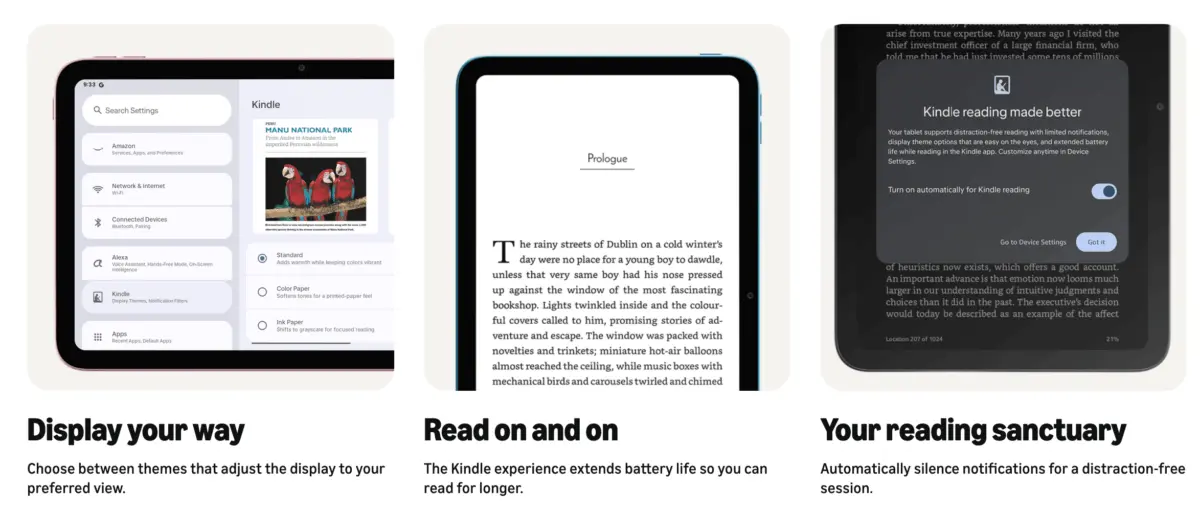
Tablets are inherently designed for multitasking. Notifications from messaging apps, flashing alerts from social media, and the temptation to switch between browser tabs and streaming services make traditional tablets notoriously poor environments for deep, uninterrupted reading. Recognizing this fundamental conflict, Amazon’s engineers developed Kindle Mode.
Automatic Activation and Contextual Awareness
Kindle Mode is designed to be frictionless. Users do not need to hunt through settings menus or toggle manual reading modes. The system monitors user activity within the native Kindle app:
- Seamless Entry: The moment a user opens a book within the native Kindle application, Kindle Mode activates automatically.
- Immediate Reversion: The instant the user exits the book or closes the application, the tablet drops out of Kindle Mode, immediately restoring the standard Android interface, active notification streams, and previous display parameters.
Background Optimizations and System-Level Tuning
When Kindle Mode is triggered, the operating system executes a series of low-level background adjustments designed to mimic the psychological and physiological experience of a dedicated e-ink e-reader:
- Total Notification Suppression: All incoming alerts, push notifications, and banner pop-ups are systematically silenced and muted. This eliminates the psychological pull of modern digital distractions, allowing readers to maintain deep cognitive immersion in their text.
- Dynamic Blue Light Reduction: The display shifts dynamically to a warmer color temperature palette. By curtailing high-energy visible (HEV) blue light emissions, the system reduces ocular fatigue during extended reading sessions, particularly in low-light environments.
- Aggressive Process Limiting: Background tasks, syncing routines, and non-essential system threads are temporarily throttled. This intelligent resource management drastically reduces power consumption, extending the tablet’s operational endurance to up to 20 hours of continuous reading on a single charge—a massive leap for an LCD/OLED tablet panel.
Advanced Display Profiles
One of the most praised innovations within Kindle Mode is the introduction of customizable Display Profiles. Because readers consume vastly different types of media—ranging from text-heavy novels to graphic-rich comic books and glossy magazines—a single screen profile is rarely ideal. Kindle Mode allows users to toggle between three distinct visual configurations:

- Classic Grayscale Look: Simulates the high-contrast, stark readability of traditional paper, reducing visual noise for long-form prose.
- Soft Muted Color Layout: Perfect for illustrated children’s books or graphic novels where sharp whites might cause eye strain over time.
- Vivid Glossy Profile: Optimizes color saturation, contrast, and brightness parameters dynamically when accessing magazines, graphic novels, or richly illustrated non-fiction.
Supporting Context & Device Ecosystem
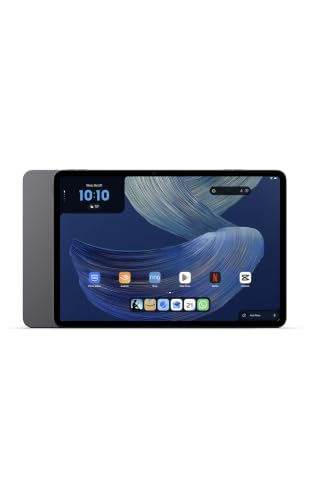
Kindle Mode is not currently available via software updates to older hardware generations. Instead, it serves as a flagship software differentiator for the inaugural release of the new Alexa Tablet family. The ecosystem currently spans three distinct hardware tiers:
- Amazon Alexa Tablet 8: A compact, highly portable 8.7-inch form factor featuring 4GB of RAM and 128GB of internal storage. Designed for readers on the go who prioritize single-handed operation.
- Amazon Alexa Tablet 11: A versatile mid-tier device boasting an 11-inch display with a stunning 2.5K resolution, paired with 8GB of RAM and 128GB of storage.
- Amazon Alexa Tablet 12 Pro: The crown jewel of the lineup, featuring a sprawling 12-inch 2.8K display available in standard configurations (8GB RAM / 128GB storage) as well as a high-end variant boasting 16GB of RAM, 256GB of storage, and an anti-glare Nanomatte display engineered specifically to mimic the light diffusion of paper under harsh overhead lighting.
Note: While these proprietary features are deeply integrated into the Amazon Alexa Tablet hardware architecture, tech publications such as Android Police have already begun exploring software workarounds and third-party launcher configurations designed to replicate aspects of Kindle Mode on competing hardware, such as Samsung Galaxy tablets.
Official Statements and Industry Reaction
The consumer electronics and publishing industries have reacted with cautious optimism to Amazon’s strategic pivot. In internal briefing notes shared with trade analysts, Amazon hardware leads emphasized that the goal of the Alexa Tablet series was never to cannibalize dedicated Kindle e-readers, but rather to serve users who demand a hybrid device capable of handling high-end productivity, media streaming, and immersive reading without compromise.
"For years, readers faced a frustrating compromise," noted industry analyst Elena Rostova in a recent commentary on mobile hardware trends. "They could carry an e-ink Kindle for reading and a separate tablet for everything else, or they could strain their eyes and fight distractions on a standard tablet. By introducing Kindle Mode on an open Android 16 platform with Google Play, Amazon has effectively built an all-in-one device that respects the reading experience."
Publishers have similarly welcomed the integration of advanced display profiles, noting that graphic novel and magazine sales on digital platforms stand to benefit immensely from the vivid glossy and soft muted rendering profiles introduced in Kindle Mode.
Future Outlook: What Next for Hybrid Reading Devices?
The introduction of Android 16-powered Alexa Tablets equipped with Kindle Mode signals a potential turning point in the design of consumer mobile hardware. As processing efficiency improves and display technology evolves, the historical divide between dedicated single-purpose reading devices (such as paper-white e-ink Kindles) and multi-purpose media tablets is beginning to blur.
Will dedicated e-readers become obsolete? Industry consensus suggests otherwise. E-ink technology still holds an unassailable advantage in direct sunlight readability and multi-week battery endurance. However, for consumers who refuse to carry multiple devices, the Amazon Alexa Tablet series represents a sophisticated compromise.
As Amazon refines Kindle Mode through subsequent software patches and expands the feature set to potentially encompass third-party reading apps like Google Play Books or Libby, the benchmark for what constitutes a "reading tablet" has been permanently elevated. Competitors in the Android ecosystem will undoubtedly monitor these developments closely, ensuring that the intersection of software-driven focus modes and high-performance hardware remains a battleground for consumer attention in the years to come.


Comments
Facebook App ID not configured. Please add it in the Customizer.