
Executive Overview
The modern digital reader lives a fragmented life. We find ourselves captivated by a compelling narrative during a morning commute, only to be forced to abandon the printed page for household chores, cooking, or driving as the evening unfolds. For years, bridging this gap meant purchasing separate, professionally narrated audiobooks—an expensive redundancy when you already own the Kindle edition of the same title. While Amazon offers native ecosystem solutions, flexibility has often been constrained by device ecosystems and proprietary software walls.
Enter CastReader, a versatile third-party utility designed to transform how readers consume their personal Kindle libraries. By integrating Text-to-Speech (TTS) technology directly into mobile apps and desktop web browsers, CastReader allows users to seamlessly pivot from visual reading to auditory absorption. Whether you are prepping dinner while listening to your favorite sci-fi thriller or scanning through dense non-fiction chapters on a tablet, the software bridges the divide between physical reading and hands-free listening.
This guide provides an authoritative, in-depth look at how CastReader operates across mobile and desktop environments, explores the inherent differences between synthetic text-to-speech and human-narrated audiobooks, evaluates system requirements and offline capabilities, and offers a practical roadmap for troubleshooting common integration hurdles.
Read Also
Detailed Chronology and Technical Setup: How CastReader Operates
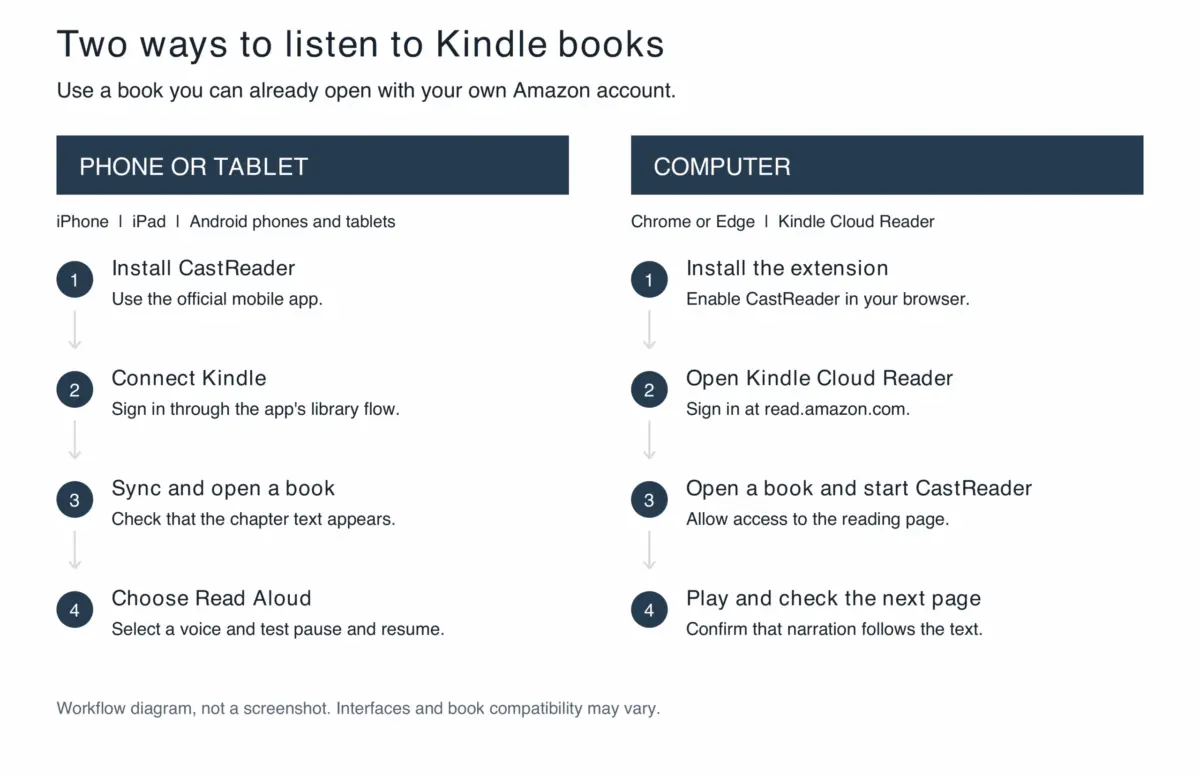
The architecture of CastReader is built around two distinct deployment routes: a dedicated mobile application for iOS and Android devices, and a specialized browser extension engineered to interface directly with Kindle Cloud Reader on desktop computers. Understanding the setup workflows for both environments ensures a frictionless transition from screen to sound.
Phase 1: Mobile Integration (iOS & Android)
The mobile workflow is tailored for readers on the go, turning smartphones and tablets into dynamic auditory extension units of their Amazon bookshelves.
- Application Deployment: Users begin by visiting the official CastReader mobile portal to download the application via the Apple App Store or Google Play Store.
- Library Synchronization: Upon launching the app, users must link their accounts. By selecting Kindle from the array of supported reading services, the application initiates an authorized handshake, synchronizing the user’s existing digital bookshelf. Crucially, this is a one-way import mechanism designed strictly to pull reading access into the workflow, preserving personal account privacy.
- Validating Structural Integrity: Before committing to a lengthy listening session, users are advised to open a familiar chapter. Digital covers can render while the underlying text structures fail to parse correctly; verifying chapter display prevents mid-session dropouts.
- Activating Read Aloud: Selecting a preferred voice and an optimal playback speed establishes the baseline for the session. CastReader features synchronized highlighting and automatic scrolling, ensuring that if a user pauses to check a visual passage, their exact location remains anchored.
- Managing Background States & Sleep Timers: Mobile users must test background audio routing, lock-screen playback controls, and network-switch behaviors. Furthermore, utilizing built-in sleep timers is essential for bedtime listening to prevent the application from streaming long after the reader has drifted off.
Phase 2: Desktop Integration (Kindle Cloud Reader via Chrome/Edge)
For users planted at a desk or working on a laptop, the desktop approach leverages browser-based infrastructure.
- Extension Installation: Users install the CastReader extension via the official Chrome Web Store or Microsoft Edge Add-ons marketplace, granting the necessary permissions to interact with authorized web reader pages.
- Initializing Kindle Cloud Reader: Navigating to
read.amazon.com, the user signs into their Amazon credentials and opens a verified title. The golden rule here is simple: if a book fails to load natively within Kindle Cloud Reader, text-to-speech extensions cannot bypass the structural failure. - Engaging the Narration Engine: Activating CastReader via the extension entry point or on-page controls initiates text parsing. The software reads the visible text on the active page, routing it through the chosen speech synthesis engine.
- Monitoring Page Transitions: Because the desktop workflow operates strictly on visible webpage DOM (Document Object Model) elements, monitoring the first major page turn is critical. Complex formatting, footnotes, and multi-column illustrations demand heightened user oversight to ensure smooth narrative continuity.
Supporting Context & Metrics: TTS vs. Human Narration
To maximize the utility of tools like CastReader, users must maintain realistic expectations regarding what synthetic text-to-speech can and cannot accomplish.
The Performance Paradigm
- Human-Narrated Audiobooks: These productions represent interpretive art. A professional voice actor brings dramatic cadence, emotional inflection, distinct character voices, and expert handling of obscure, foreign, or fantastical terminology. They provide a singular, curated artistic experience.
- Text-to-Speech (TTS): Modern neural TTS engines offer astonishing clarity, adjustable playback speeds, and a variety of natural-sounding synthetic voices. However, they lack deep contextual interpretation. A TTS engine will process an alien name or an archaic dialect strictly through phonetic algorithms, occasionally yielding jarring pronunciations.
When to Listen vs. When to Read
The smartest readers do not view TTS as a wholesale replacement for traditional audiobooks or physical reading; rather, they deploy it as a situational lever:
| Medium / Format | Best Suited For | Avoid When Facing |
|---|---|---|
| Visual Reading (Screen/Paper) | Complex non-fiction, poetry, dense footnotes, intricate diagrams, maps. | Doing manual labor, driving, or multitasking. |
| Text-to-Speech (CastReader) | Familiar novels, narrative-driven fiction, catching up on chapters during chores. | Complex multi-character dialogue heavy with unfamiliar lexicon. |
| Professional Audiobooks | Premium artistic performances, theatrical memoirs, complex epics. | Tight budgets where you already own the Kindle text edition. |
Furthermore, users must remember that CastReader does not supply the underlying content. The software is an accessibility and processing layer; users must maintain independent, active Amazon accounts and legitimate purchasing rights or subscription access (such as Kindle Unlimited) to the titles they wish to convert.

Official Guidelines and Advanced Features
Navigating CastReader’s advanced capabilities requires a nuanced understanding of its ecosystem limitations, offline behaviors, and AI-driven enhancements.
The Offline Reality
A common point of confusion among mobile users involves offline functionality. While current iOS release notes indicate that users can save a Kindle book via the player’s More menu—storing it under "Offline Books" in settings for local system-voice narration—this capability does not extend universally across all platforms.
- Cloud AI Voices vs. Local Voices: Premium cloud-based neural AI voices and advanced server-dependent tools (such as AI Explain) require an active internet connection.
- Pre-Trip Verification: Before embarking on a flight or entering a cellular dead zone, users must explicitly cache the content within their installed mobile version, disconnect their network, and test a short passage to confirm that caching was successful. A downloaded book cover is not proof of offline audio caching.
Leveraging AI Explain Responsibly
CastReader features an "AI Explain" utility designed to help readers digest complex arguments or unfamiliar thematic elements. However, users must treat this tool as a supplementary guide rather than a canonical authority. AI explanations reorganize and summarize source material; they do not quote the author verbatim and should never serve as a substitute for reading the complete original text.
Subscription Economics
CastReader operates on a tiered pricing model designed to accommodate casual listeners and power users alike:
- Free Tier: Offers a limited daily allowance of listening time, ideal for testing compatibility with your personal library.
- Pro Tier: Unlocks expanded standard narration limits and advanced AI tools.
- Pricing Structure: Standard web-based subscriptions are priced at $4.99 monthly or $35.99 billed annually (note that regional app store pricing, local taxes, and currency conversions may vary).
Crucial Caveat: Subscribing to CastReader grants access to the narration and utility software only; it does not offset the purchase price or licensing rights of the underlying books.
Future Outlook and Troubleshooting Frameworks
As digital publishing continues to evolve, tools that break down silos between reading formats will become increasingly indispensable. However, transitioning text from proprietary ecosystems into speech synthesizers inevitably introduces technical friction.
If you encounter interruptions during your listening sessions, utilize the following systematic troubleshooting hierarchy:
- Missing Books:
- Cause: Account synchronization failure or invalid login credentials.
- Solution: Verify that you are signed into the correct Amazon account. Confirm that the book opens natively within the official Kindle app or Cloud Reader before attempting to force a refresh within CastReader.
- Narration Fails to Initialize:
- Cause: Incomplete webpage DOM loading, network latency, or blocked browser permissions.
- Solution: Wait for the body text to fully render on screen. On desktop platforms, verify that the browser extension is explicitly enabled and possesses active permissions for the current reading domain.
- Stuttering, Repetition, or Skips Upon Page Turns:
- Cause: Discrepancies between visual pagination and the text-parsing algorithm.
- Solution: Pause playback, manually locate your precise position in the original text, and restart the stream from that clean anchor point. Ensure your mobile app or desktop extension is updated to the latest release, as developers frequently deploy continuity patches for page transitions.
- Mispronounced Names or Terms:
- Cause: Phonetic limitations of synthetic speech engines.
- Solution: Adjust the playback speed or switch to an alternative system voice within the settings menu. If comprehension is severely impacted, return to the visual text; synthetic speech should never be treated as an authoritative guide on pronunciation.
Conclusion
CastReader represents a pragmatic evolution for digital book lovers. By effectively transforming Kindle titles into on-demand audio experiences, it honors the reality of our busy, multitasking lives without forcing us to re-purchase our libraries in audiobook format. By understanding its technical boundaries, mastering its mobile and desktop workflows, and applying its features judiciously alongside traditional reading habits, users can unlock entirely new dimensions of productivity and literary enjoyment.



Comments
Facebook App ID not configured. Please add it in the Customizer.