
Executive Overview
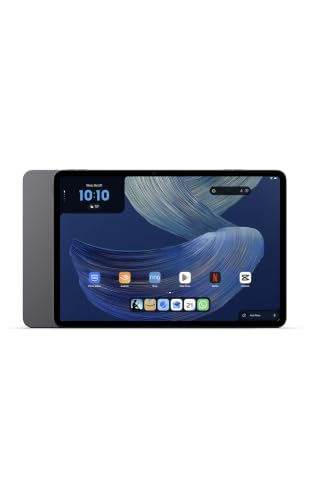
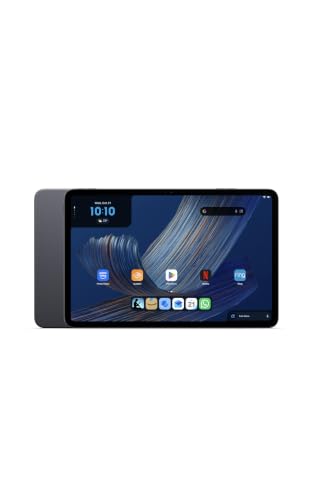
In a strategic hardware pivot that has taken the consumer technology landscape by surprise, Amazon has officially introduced an entirely new generation of mobile computing devices: the Alexa Tablet lineup. Powered by Android 16 and offering native, unfiltered access to the Google Play Store, these new slates represent a radical departure from Amazon’s historical hardware philosophy.
For over a decade, Amazon’s tablet strategy was inextricably tied to FireOS—a heavily modified, walled-garden fork of Android constrained by the Amazon Appstore. While FireOS succeeded in creating affordable, media-consumption-focused devices deeply integrated with Prime services, it was frequently criticized for lacking mainstream third-party applications and developer tools. By dropping FireOS in favor of mainstream Android 16 and opening the gates to the Google Play Ecosystem, Amazon is signaling a major shift in how it views the tablet market, positioning its hardware to compete directly with mainstream heavyweights like Samsung and Lenovo.
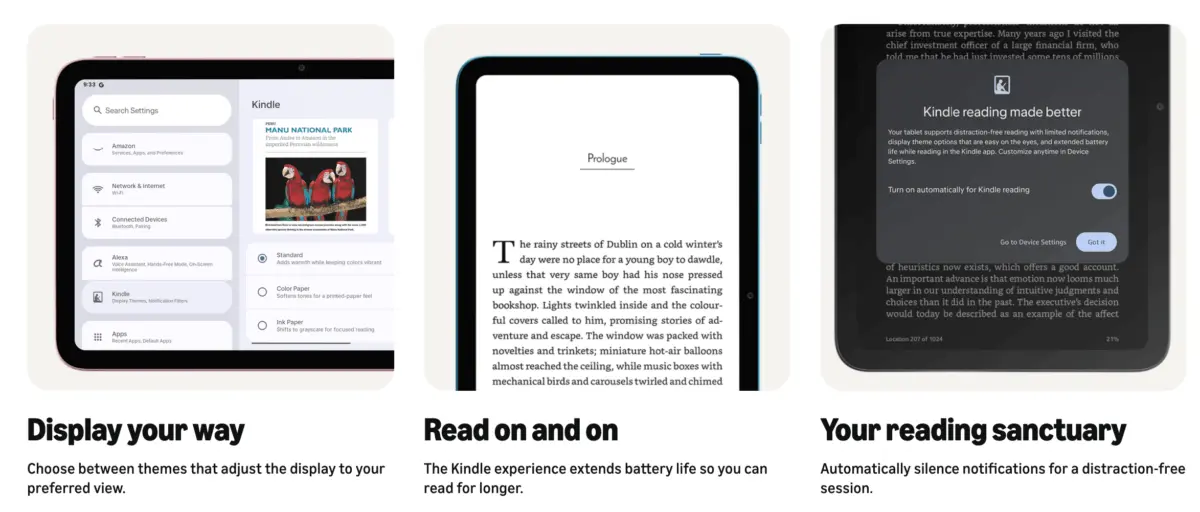
At the center of this new ecosystem is a breakthrough software feature tailored specifically for digital readers: Kindle Mode. Designed to bridge the gap between multipurpose tablets and dedicated e-readers, Kindle Mode automatically transforms the device into a distraction-free, eye-friendly sanctuary the moment a user opens a book in the native Kindle application. As consumers increasingly demand hybrid devices that can balance productivity, entertainment, and wellness, Amazon’s Alexa Tablet series—and Kindle Mode in particular—could redefine what we expect from a modern multi-device tablet.
Read Also
Detailed Chronology: The Evolution to Android 16 and Kindle Mode
To understand the magnitude of Amazon’s recent announcement, one must look back at the trajectory of the company’s hardware division. For years, the prevailing narrative surrounding Amazon Fire tablets was simple: compromise hardware performance and software flexibility in exchange for rock-bottom pricing. While this strategy successfully captured price-conscious consumers and families looking for dedicated media consumption tools, it alienated power users and professionals who required access to the expansive Google Play ecosystem, standard productivity applications, and unencumbered Android updates.

Breaking the Walled Garden
Whispers of a foundational shift began circulating earlier this year, but the official confirmation arrived a few weeks ago when Amazon unveiled its new brand of tablets simply monikered the "Alexa Tablets." Abandoning the aging FireOS framework entirely, the company took the bold step of adopting Android 16 straight out of the box.
Crucially, this rollout included full, uninhibited access to the Google Play Store. Users no longer need to rely on cumbersome, unofficial side-loading methods to install essential apps like Google Docs, Microsoft Office, mainstream web browsers, or advanced developer tools. By aligning itself with standard Android architecture, Amazon has modernized its hardware appeal overnight.
The Birth of Kindle Mode
With the hardware barriers removed, Amazon engineers faced a classic tablet dilemma: while consumers love the versatility of a high-resolution, full-color screen for browsing and streaming, reading traditional e-books on a standard tablet often leads to eye fatigue, battery drain, and constant interruptions from incoming notifications, social media alerts, and emails.
To solve this, Amazon developed Kindle Mode—a contextual, automated operating state engineered specifically for the native Kindle app. Unlike traditional "Reading Modes" or "Do Not Disturb" toggles that require manual activation through quick-settings menus, Kindle Mode is entirely seamless. It activates the exact moment a user opens a book within the native Kindle application and instantly deactivates upon exiting the app or closing the reader, returning the slate to its standard Android interface.
Supporting Context & Metrics: Under the Hood of Kindle Mode
Kindle Mode is much more than a simple visual theme; it is a holistic system-level adjustment that fundamentally alters how the tablet consumes power, manages notifications, and renders text and images. When triggered, Kindle Mode initiates several background optimizations:
1. The Distraction-Free Sanctuary
The modern tablet is a relentless attention economy machine, constantly buzzing with push notifications, chat alerts, and email banners. Kindle Mode treats reading as a focused, mindful activity by automatically muting and silencing all incoming notifications. This creates a psychological boundary between the chaotic world of multitasking and the immersive environment of long-form literature.
2. Ocular Comfort and Blue-Light Reduction
Long-term exposure to standard high-brightness, blue-light-heavy tablet displays can suppress melatonin production and strain human eyes. Upon entering Kindle Mode, the system automatically shifts the display’s color temperature to a warmer, softer spectrum. This significantly reduces eye fatigue during extended reading sessions, particularly in low-light environments.
3. Battery Longevity Through Resource Management
Tablets are notoriously power-hungry due to their complex processors, high refresh rates, and background services. By limiting non-essential background processes and optimizing CPU thread allocation during reading, Kindle Mode dramatically extends device endurance. According to Amazon’s hardware specifications, enabling this mode allows the tablets to achieve up to 20 hours of continuous reading on a single charge—rivalling dedicated E Ink devices while maintaining the computational power of a modern Android tablet.

4. Advanced Display Profiles
One of the most innovative technical achievements of Kindle Mode is its support for dynamic display profiles. Recognizing that digital content varies wildly—ranging from text-heavy novels to graphic-rich comic books and glossy magazines—Amazon built a multi-profile system:
- Classic Grayscale Profile: Mimics the appearance of traditional printed paper, ideal for standard novels and text-heavy non-fiction.
- Soft Muted Color Layout: Perfect for illustrated children’s books and graphic novels, balancing color accuracy with reduced glare.
- Vivid Glossy Profile: Tailored for digital magazines, art books, and high-definition comic portfolios, leveraging the full capability of the tablet’s high-resolution display when vibrant imagery is required.
Official Statements and Hardware Lineup
The rollout of Android 16 and Kindle Mode is anchored by an entirely new product family designed to cater to different segments of the market. Amazon has initially launched three distinct models within the Alexa Tablet lineup:
- Amazon Alexa Tablet 8: A highly portable, compact 8.7-inch device featuring 4GB of RAM and 128GB of internal storage, designed for readers on the go who need a pocket-friendly form factor.
- Amazon Alexa Tablet 11: A versatile mid-tier device boasting an 11-inch 2.5K high-resolution display, 8GB of RAM, and 128GB of storage, offering an optimal balance between media consumption and productivity.
- Amazon Alexa Tablet 12 Pro: The flagship powerhouse available in multiple configurations, including a standard 8GB RAM / 128GB storage model with a stunning 12-inch 2.8K display, and a high-end 16GB RAM / 256GB storage variant featuring an advanced 2.8K Nanomatte display designed to diffuse ambient glare and simulate a paper-like texture.
Industry analysts have noted that while these devices are built by Amazon, their adoption of open Android architecture opens up fascinating cross-ecosystem discussions. For instance, tech publications such as Android Police have already begun exploring ways users might replicate aspects of Kindle Mode on competing hardware, such as Samsung Galaxy tablets, highlighting the widespread industry interest in Amazon’s software innovation.
Future Outlook: What Kindle Mode Means for the Future of Reading
Amazon’s introduction of the Alexa Tablet series and Kindle Mode marks a fascinating convergence in consumer electronics. For years, the market has been cleanly divided into two camps: E Ink e-readers (such as the Kindle Paperwhite or Kindle Scribe), which excel at eye comfort and battery life but fail at multimedia tasks, and multi-purpose tablets, which excel at video streaming and web browsing but falter as comfortable, distraction-free reading platforms.
By bridging this gap, Amazon is aggressively targeting the "one-device-for-everything" consumer. Instead of requiring users to carry a dedicated e-reader for books and a separate tablet for emails, apps, and streaming, the Alexa Tablet aims to be a true hybrid.
Looking forward, several key questions remain. Will Amazon eventually port Kindle Mode back to older Fire tablets via software updates, or will it remain an exclusive selling point for the new Android-powered Alexa lineup? Furthermore, how will competitors like Apple and Samsung respond to a mainstream tablet explicitly optimized for long-form reading wellness?
What is certain, however, is that Amazon has rewritten the rules of its hardware playbook. By embracing Android 16, opening the Google Play Store, and introducing thoughtful productivity and wellness tools like Kindle Mode, Amazon is positioning its hardware division not just as a budget alternative, but as a serious, forward-thinking competitor in the global tablet market. For avid readers who have long resisted transitioning to tablets due to eye strain and digital distractions, the new Alexa Tablets just might be the definitive device they have been waiting for.




Comments
Facebook App ID not configured. Please add it in the Customizer.