
Executive Overview
The landscape of digital public library lending is undergoing a quiet yet profound transformation. For years, the ecosystem for borrowing digital books—e-books and audiobooks—has been largely dominated by a few major players, most notably OverDrive and its ubiquitous consumer-facing application, Libby. While alternative platforms such as cloudLibrary (developed by bibliotheca) have long provided robust collection management tools for public libraries, their integration into dedicated hardware e-readers has historically lagged behind that of their primary competitors.
That dynamic is now shifting. According to emerging industry reports and early beta documentation, cloudLibrary and Rakuten Kobo are actively collaborating on a direct integration pipeline. This partnership is rolling out in phases, beginning with a restricted pilot program across select public libraries in September, followed by a broader, device-focused rollout in October.
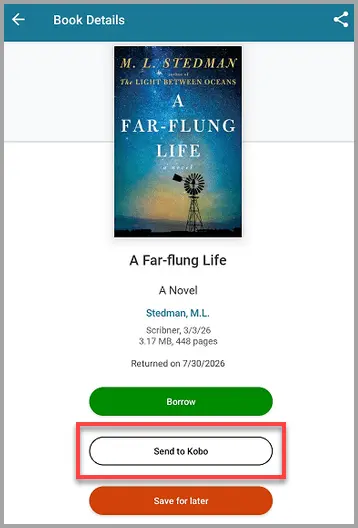
The initial phase targets some of Kobo’s most popular modern hardware iterations, including the Kobo Clara Color, the Kobo Clara BW, and the Kobo Libra Color. By introducing a new "Send to Kobo" action within the cloudLibrary application and website ecosystems, the integration aims to bridge the gap between library catalog curation and dedicated e-paper reading devices.
Read Also
While this development represents a major leap forward for library patrons who prefer hardware other than Amazon Kindle or standard mobile tablets, the current iteration of the beta reveals certain functional limitations. Specifically, the feature is presently restricted to e-books—excluding audiobooks from the pipeline—and requires users to initiate transfers primarily through cloudLibrary’s native app or web interface rather than natively browsing the catalog directly from the e-reader’s settings menu (as is currently possible with OverDrive/Libby integrations on Kobo devices).
This article provides an in-depth, investigative look at the cloudLibrary-Kobo integration, exploring its mechanics, limitations, the broader competitive landscape of digital library lending, and what this partnership means for the future of portable reading.
Detailed Chronology and Technical Mechanics
To understand the significance of the cloudLibrary and Kobo partnership, it is helpful to trace how digital library borrowing has traditionally functioned on hardware devices and how this specific integration is being engineered.
The Mechanics of "Send to Kobo"
In the current beta testing phase, the user journey for borrowing and reading a library book on a Kobo device via cloudLibrary involves a few distinct steps:
- Discovery and Selection: Users browse their local public library’s catalog either through the cloudLibrary mobile application or via the cloudLibrary desktop website. Alternatively, titles can occasionally be discovered through participating libraries’ general online catalogs.
- The "Send to Kobo" Trigger: Once a desired e-book is located, the user selects a newly introduced interface element: the "Send to Kobo" button. This action formally checks out the digital asset from the library’s digital inventory and queues it for wireless delivery.
- Cloud Synchronization: The book file is pushed through cloud infrastructure directly to the user’s registered Kobo e-reader upon the device’s next synchronization cycle, appearing in the local library dashboard or home screen ready for offline reading.
Phased Rollout Schedule
The implementation strategy has been structured carefully to ensure stability and gather user feedback:
- September Beta Phase: A limited trial period deployed to select libraries and specialized training cohorts (such as digital library academies). This phase serves as a stress test for server-to-device communication, DRM (Digital Rights Management) handshake verification, and user authentication protocols.
- October General Expansion: A wider rollout targeting specific Kobo hardware models, prominently featuring the brand’s color e-paper devices—the Kobo Clara Color and Kobo Libra Color—as well as the monochrome Kobo Clara BW.
Current Limitations and Architectural Constraints
While the "Send to Kobo" workflow provides a much-needed alternative to sideloading files manually via Adobe Digital Editions and USB cables, industry observers note several constraints in the current beta architecture:
- No Audiobook Support: The current iteration of the integration strictly handles reflowable text e-books. Kobo devices capable of playing audiobooks (via Bluetooth headphones) cannot yet receive audio titles checked out through cloudLibrary using this direct method.
- Exclusively Outbound Workflows: Unlike the native OverDrive/Libby integration on Kobo devices—where users can search catalogs, place holds, and manage loans directly from the e-reader’s built-in search bar and settings menu—the cloudLibrary system presently requires users to step outside the e-reader device. Patrons must use a secondary device (smartphone, tablet, or computer) to visit the cloudLibrary app or website to trigger the transfer.
- Single Account Limitation: Architectural expectations indicate that users will likely be restricted to attaching a single cloudLibrary account to their Kobo device at any given time, mirroring historical limitations seen with single-card integrations on various hardware platforms. Whether multi-library card support—a staple of apps like Libby—will eventually be introduced to the on-device cloudLibrary experience remains unconfirmed.
Supporting Context and Metrics: The Digital Lending Ecosystem
To contextualize why this integration matters, one must examine the broader economics and operational frameworks governing public libraries and digital reading hardware.
The Duopoly of Library E-Reading
For over a decade, the market for digital library distribution in North America and many parts of Europe has been characterized by consolidation. OverDrive, alongside its consumer app Libby, commands the vast majority of public library contracts. Amazon’s Kindle integration with OverDrive/Libby (allowing U.S. library patrons to send borrowed books directly to Kindle devices via Amazon’s ecosystem) has further cemented a two-horse race between Amazon hardware and Kobo hardware for library-centric readers.
However, many libraries consciously diversify their digital vendor portfolios to avoid vendor lock-in, manage licensing costs, and support alternative platforms. CloudLibrary, managed by bibliotheca, is one of the most prominent alternatives. It is utilized by thousands of public library systems worldwide to manage digital collections, offering flexible purchasing models, patron-driven acquisition tools, and streamlined user interfaces.

The Hardware Battleground: Color E-Paper Arrives
The timing of the cloudLibrary-Kobo integration is far from accidental. The consumer e-reader market is currently undergoing its most significant hardware shift in over a decade: the mass adoption of color electronic paper technology.
Devices like the Kobo Clara Color and Kobo Libra Color—both utilizing advanced Kaleido 3 color e-paper screens—have captured the imagination of readers who consume graphic novels, comic books, children’s literature, and non-fiction texts rich in color charts and illustrations. Because public libraries are major repositories for graphic novels and illustrated children’s books, enabling seamless cloudLibrary lending specifically on these color-capable Kobo models opens up entirely new use cases for digital library patrons.
+-----------------------------------------------------------------+
|               Digital Library Lending Ecosystem                 |
+----------------------------------+------------------------------+
| Dominant Platform                | Alternative Platform         |
| OverDrive / Libby                | cloudLibrary (bibliotheca)   |
+----------------------------------+------------------------------+
| Primary Hardware Partners        | Expanding Hardware Partners  |
| - Amazon Kindle (via web push)   | - Rakuten Kobo (New Beta)    |
| - Kobo (Native on-device search) | - PocketBook / Android       |
+----------------------------------+------------------------------+
Official Perspectives and Industry Insights
While formal press releases from Rakuten Kobo and bibliotheca have been measured as the partnership enters its initial trial phase, digital library professionals and library science advocates have offered extensive commentary on the development.
The Library Perspective
Librarians and collection development specialists have long advocated for broader interoperability between library vendor software and consumer reading hardware. Speaking anonymously due to ongoing NDA agreements surrounding the beta test, one metropolitan library system digital services coordinator noted:
"For years, our patrons who prefer Kobo devices have faced a fragmented experience if our library system heavily utilized cloudLibrary for specific publishing houses or special collections. While Libby has enjoyed direct native support, cloudLibrary users often had to resort to cumbersome manual file transfers. A streamlined ‘Send to Kobo’ button represents a massive win for accessibility and reduces technical support inquiries at our circulation desks."
The Vendor Strategy
For bibliotheca, expanding cloudLibrary’s hardware footprint is an existential necessity in an increasingly hardware-agnostic reading market. By partnering with Kobo—a company that has positioned itself as the premier open-ecosystem alternative to Amazon’s walled garden—bibliotheca ensures that its institutional clients can offer competitive, friction-free digital lending experiences to patrons regardless of whether they choose Kindle, Kobo, or generic Android e-readers.
For Kobo, deepening integration with additional library platforms strengthens its value proposition against competitors. Kobo has historically built its brand on openness, supporting multiple file formats (EPUB, PDF, CBR/CBZ) and resisting the tight proprietary restrictions historically favored by major competitors. Adding robust library lending options aligns squarely with this brand ethos.
Future Outlook: What Lies Ahead for Digital Reading
As the cloudLibrary and Kobo integration moves past its initial September beta and into its broader October deployment, several key questions remain regarding the future trajectory of the service.
Will Native On-Device Browsing Arrive?
The most pressing question for power users is whether the integration will evolve beyond the current "Send to Kobo" web-push model. Patrons accustomed to the seamless, self-contained nature of Libby on Kobo—where entire loans can be executed without ever touching a smartphone or computer—may find the requirement to use an external app or website to be an unnecessary friction point. Industry analysts speculate that if the beta proves technically stable, future firmware updates could introduce native cloudLibrary browsing directly into the Kobo user interface, though software engineering hurdles regarding multi-vendor API integrations remain significant.
Expanding Beyond E-Books
As audiobook consumption continues to soar among library patrons, the exclusion of audiobooks from the initial cloudLibrary-Kobo beta is a notable limitation. Kobo devices are increasingly equipped with Bluetooth audio capabilities, making them viable listening devices. Future iterations of the partnership will likely face mounting pressure from libraries and consumers alike to bridge the audio gap, enabling seamless transfers of digital audio assets alongside traditional text-based e-books.
Conclusion
The collaboration between cloudLibrary and Rakuten Kobo marks a milestone in the ongoing evolution of digital public libraries. By breaking down silos between institutional collection software and consumer reading hardware, the partnership promises to deliver a more inclusive, flexible, and user-friendly reading experience. While the current beta phase reveals predictable growing pains—such as the restriction to e-books and the necessity of external trigger mechanisms—the overarching direction is clear: digital library lending is becoming more integrated, more accessible, and better equipped to serve the modern, multi-device reader.





Comments
Facebook App ID not configured. Please add it in the Customizer.