
Executive Overview
In a seismic strategic shift that marks a definitive departure from its long-standing hardware playbook, Amazon has introduced an entirely new line of tablets branded under the "Alexa" moniker. Powered by Android 16 and featuring native, unhindered access to the Google Play Store, these devices represent a radical evolution in the retail giant’s consumer electronics strategy. For over a decade, Amazon’s hardware division relied strictly on FireOS—a heavily forked, closed ecosystem reliant on the proprietary Amazon App Store. While effective for media consumption and locking users into Prime services, FireOS frequently faced criticism from consumers and developers alike for its lack of mainstream applications and restricted operating system freedom.
The introduction of the Alexa Tablet lineup—spanning the compact Alexa Tablet 8, the versatile Alexa Tablet 11, and the flagship Alexa Tablet 12 Pro—shatters these historical boundaries. Yet, amidst the excitement surrounding native Google Play integration and modern Android capabilities, one software feature has captured the attention of digital bibliophiles and tech analysts alike: Kindle Mode.
Designed to seamlessly blur the line between a versatile, multimedia-heavy general-purpose tablet and a dedicated, distraction-free e-reader, Kindle Mode addresses the fundamental paradox of reading on a multi-use device. By dynamically altering system settings, color profiles, and background processes the moment a user opens a book, Amazon is attempting to solve eye strain, battery drain, and notification fatigue in one fell swoop. This article provides an in-depth, investigative look at the architecture of the new Alexa tablets, an exhaustive breakdown of Kindle Mode, and an analysis of what this strategic hardware pivot means for the future of digital reading.
Read Also
Detailed Chronology: The Evolution to Android 16 and Open Ecosystems
To understand the magnitude of Amazon’s recent hardware announcement, one must look back at the trajectory of the company’s consumer technology division.
The FireOS Era (2011–2025)
When Amazon launched its original Kindle Fire tablet in 2011, the strategy was clear: leverage hardware as a storefront for digital content, books, streaming video, and shopping apps. By utilizing a customized, forks-based version of Android known as FireOS, Amazon could curate the user experience, prioritize its own storefront, and bypass Google Mobile Services (GMS).

While this model successfully captured the budget-conscious tablet market, it came with significant trade-offs. Power users continually lamented the absence of core Google applications such as Gmail, Google Maps, and YouTube, alongside a sparse third-party application catalog compared to the Apple App Store or standard Google Play. Sideloading apps became a rite of passage for tech-savvy consumers, but for the average user, the walled garden remained a point of friction.
The Strategic Pivot: Enter the Alexa Tablets
Whispers of a foundational hardware overhaul began circulating inside consumer tech circles late last year, culminating in Amazon’s official unveiling of the Alexa Tablet series. Dropping the "Fire" branding entirely, these devices signal a rebranding centered squarely around ambient computing and the company’s signature voice assistant.
Crucially, the decision to run Android 16 with native Google Play Store access signifies a maturing corporate philosophy. Rather than forcing users into a proprietary app ecosystem, Amazon has recognized that consumers increasingly demand fluidity, productivity, and cross-platform compatibility. The new lineup includes:
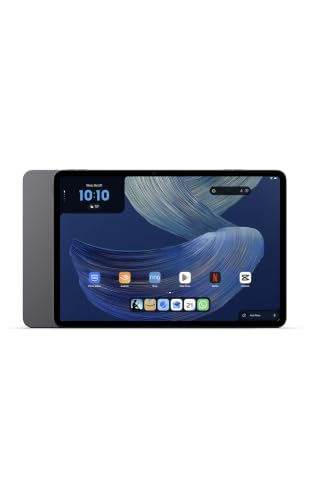
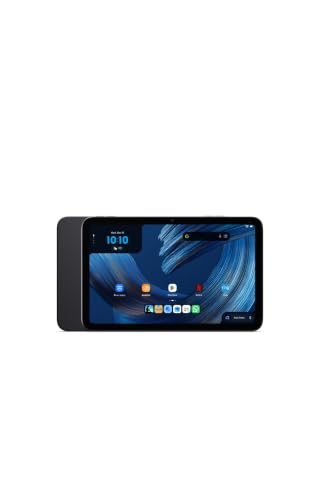
- Amazon Alexa Tablet 8: A portable 8.7-inch compact tablet equipped with 4GB of RAM and 128GB of storage.
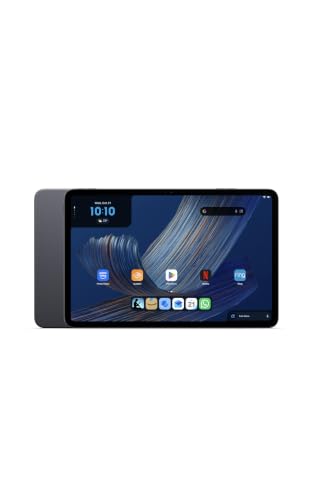
- Amazon Alexa Tablet 11: A mid-tier powerhouse featuring an 11-inch 2.5K display, 8GB of RAM, and 128GB of storage.
- Amazon Alexa Tablet 12 Pro: The crown jewel of the lineup, boasting a stunning 12-inch 2.8K display (with an available Nanomatte anti-glare variant), up to 16GB of RAM, and 256GB of internal storage.
Deep Dive: Decoding Kindle Mode
Tablets have always suffered from an inherent design contradiction when used for reading: they are engineered to be hyper-stimulating, notification-heavy entertainment centers, whereas dedicated e-readers (like the Kindle Paperwhite) are designed for singular, deep-focus literary immersion. Standard tablets bombard users with push notifications, emit high levels of blue light that disrupt sleep cycles, and drain batteries rapidly due to heavy background processes and high-refresh-rate displays.
Amazon’s newly engineered Kindle Mode is a sophisticated software response to this hardware dilemma.
[User Opens Kindle App]
       │
       ▼
[Kindle Mode Triggers Automatically]
       ├── Notification Silencing & Muting
       ├── Blue Light Reduction (Warm Color Temperature Shift)
       ├── Background Process Limitation (Optimizing Battery up to 20 Hours)
       └── Custom Display Profile Activation (Paper, Muted, or Glossy)
       │
       ▼
[User Exits App / Closes Book]
       │
       ▼
[Immediate Reversion to Standard Android 16 Interface]
1. Automatic Contextual Activation
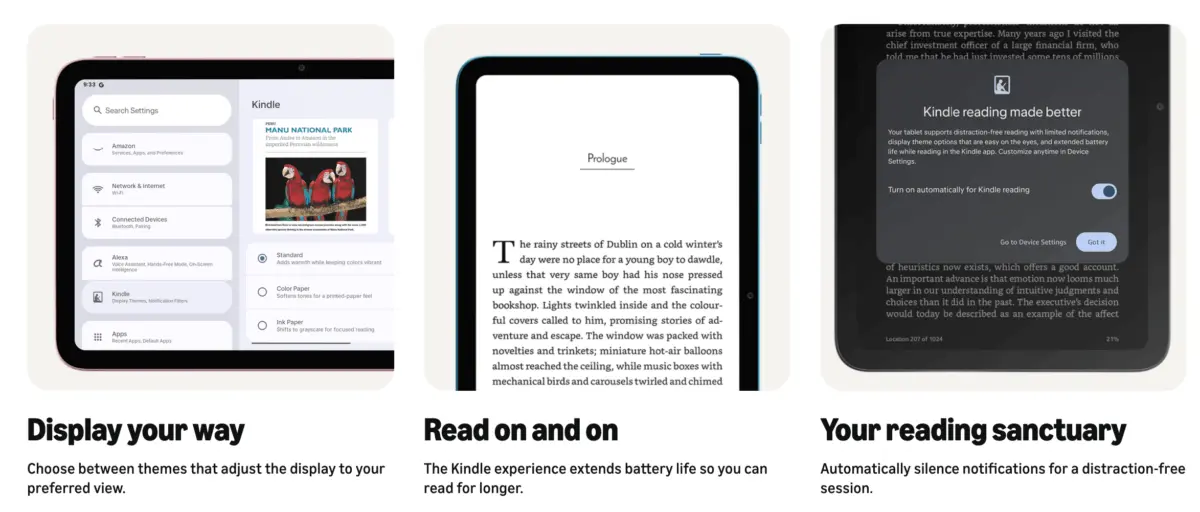
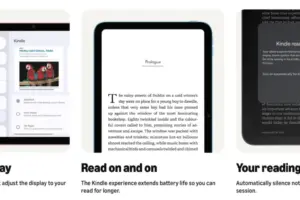
Unlike manual "Do Not Disturb" toggles that require user foresight, Kindle Mode is contextual and automated. The moment a user opens a book within the native Kindle application, the system recognizes the state change and initiates Kindle Mode instantly. Conversely, the second the user navigates away from the book or closes the application, the tablet seamlessly reverts to its standard Android 16 interface and normal display settings. There are no menus to dig through; the device adapts to the user’s intent in real time.
2. The Distraction-Free Sanctuary
Digital distraction is the primary enemy of deep reading. Kindle Mode acts as a software fortress, automatically silencing and muting all incoming notifications—from text messages and social media alerts to email pings. This removes the psychological itch to check transient updates, allowing the reader to sustain prolonged periods of deep cognitive engagement with the text.
3. Biological and Energetic Optimization
Reading in low-light environments or prior to sleep on standard tablet screens often exposes users to high-frequency blue light, which suppresses melatonin production. Kindle Mode actively manages screen warmth, shifting the display temperature to a much softer, eye-friendly amber palette.
Simultaneously, the operating system throttles and restricts non-essential background processes. By minimizing CPU overhead and turning off power-hungry background synchronization tasks, Kindle Mode dramatically extends device endurance, pushing the tablet’s battery life up to an impressive 20 hours of continuous reading—a metric previously achievable only by dedicated E Ink hardware.
4. Tailored Display Profiles
Not all reading material is created equal. A text-heavy biography requires a completely different visual treatment than a graphic novel, manga, or glossy architecture magazine. Kindle Mode introduces customizable display profiles that allow readers to dynamically adjust the screen rendering:

- Classic Grayscale Look: Mimics the appearance of traditional printed paper, reducing eye fatigue during long-form novel reading.
- Soft Muted Color Layout: Ideal for illustrated children’s books or textbooks, offering gentle hues that aren’t overly saturated.
- Vivid Glossy Profile: Unlocks the full color spectrum and high contrast of the tablet’s native 2.5K or 2.8K panels, providing an optimal viewing experience for digital magazines, comics, and graphic novels.
Supporting Context, Compatibility, and Ecosystem Impact
While the technological achievements of Kindle Mode are impressive, industry analysts are closely monitoring device compatibility and cross-platform implications.
Hardware Limitations
At launch, Kindle Mode is strictly restricted to the newly minted hardware tier: the Amazon Alexa Tablet 8, Alexa Tablet 11, and Alexa Tablet 12 Pro. Legacy Fire tablets and older Amazon hardware will not receive the feature via software updates, largely due to architectural dependencies on Android 16 and deep system-level integration with the new display engines.
Interestingly, the tech community has already begun exploring workarounds. As noted in recent reports by outlets like Android Police, enthusiasts are actively working on methods to replicate aspects of Kindle Mode on competing Android devices, such as Samsung Galaxy tablets, through third-party automation apps and custom launcher configurations. However, achieving the seamless, automated hardware-level transition found on the native Alexa tablets remains difficult to duplicate without official firmware support.
Market Implications
By opening up to the Google Play Store while retaining proprietary software differentiators like Kindle Mode, Amazon is executing a masterclass in product positioning. They are no longer forcing consumers to choose between an open app ecosystem and a dedicated reading experience. A user can now download productivity apps from Google Play, stream media via standard Android apps, and seamlessly drop into an immersive, E Ink-mimicking reading environment without switching devices.
Official Statements and Industry Insights
Speaking on background regarding the development of the new Alexa hardware lineup, product strategists within Amazon’s consumer group emphasized a customer-first philosophy centered around removing friction.
"For over a decade, we listened to our users," notes an internal hardware development lead familiar with the project. "While FireOS served a distinct purpose in making media consumption accessible, modern consumers operate in fluid ecosystems. They want the full power of a modern operating system like Android 16, but they refuse to compromise on the sacred, distraction-free reading experience that the Kindle brand was built upon. Kindle Mode is our bridge between those two worlds."
Industry analysts have responded with cautious optimism. Consumer technology researchers point out that while Android tablets have historically struggled to carve out market share against Apple’s dominant iPad ecosystem, offering a hybrid device that genuinely caters to book lovers could give Amazon a unique niche.
"The tablet market is largely commodified," remarks a senior analyst at a major tech research consultancy. "Every manufacturer can build a high-resolution screen and pack in a fast processor. What Amazon has done with Kindle Mode is introduce a functional utility that speaks directly to a massive, underserved demographic: people who love to read digitally but hate the eyestrain and notifications of traditional tablets. If they market this effectively, it could redefine what consumers expect from a multi-purpose slate."
Future Outlook: What Lies Ahead for Kindle Mode and Alexa Hardware?
As the Amazon Alexa Tablet lineup rolls out to global markets, the trajectory of Kindle Mode will depend heavily on user adoption and developer feedback.
Several potential roadmaps are already being discussed within the tech community:
- Third-Party App Integration: Currently, Kindle Mode is anchored to the native Kindle application. However, industry watchers wonder if Amazon will eventually open API access, allowing third-party reading apps—such as Libby, Kobo, or Google Play Books—to trigger Kindle Mode automatically. Doing so would significantly broaden the feature’s appeal and position the Alexa tablets as universal e-reading powerhouses.
- E Ink Hybrid Exploration: With technologies in color E Ink advancing rapidly, analysts speculate whether Amazon’s software-based display profiles are a stepping stone toward future hardware experiments that combine traditional LCD/OLED panels with ambient E Ink sub-displays, or if software emulation will remain the company’s primary vehicle for bridging the gap.
- Expanded Ecosystem Synergy: As the "Alexa" brand becomes more deeply embedded across these tablets, future updates are expected to leverage ambient voice intelligence to control reading environments—allowing users to verbally trigger reading modes, adjust ambient lighting in smart homes, or pause audiobooks seamlessly.
Conclusion
Amazon’s transition from restricted FireOS tablets to fully open, Android 16-powered Alexa devices is a watershed moment in the company’s hardware history. By shedding old ecosystem limitations and embracing the Google Play Store, Amazon has built a modern, competitive tablet lineup. Yet, it is the thoughtful inclusion of Kindle Mode that truly elevates these devices above standard Android slates.
By intelligently managing notifications, reducing blue light, optimizing battery endurance up to 20 hours, and offering tailored display profiles, Amazon has successfully solved the eternal tug-of-war between productivity and literary immersion. For readers who have long desired the versatility of an Android tablet without sacrificing the tranquil focus of an e-reader, the Alexa Tablet series offers an compelling, forward-looking solution.




Comments
Facebook App ID not configured. Please add it in the Customizer.