
Executive Overview
The modern digital reader lives in a state of perpetual transition. We move effortlessly from the intense, quiet focus of a Sunday morning armchair session to the frantic, multitasking environment of evening meal preparation, public transit commutes, and household chores. For decades, bridging the gap between visually reading a digital book and audibly consuming it required either purchasing duplicate formats—both an e-book and a professionally narrated audiobook—or relying on clunky, limited accessibility tools native to specific hardware ecosystems.
Today, the landscape of mobile and desktop reading is shifting. Third-party software integrations are emerging to untether users from rigid ecosystem constraints. Tools like CastReader have stepped into the spotlight, offering a hybrid bridge that allows users to sync their existing Kindle libraries directly to mobile applications or leverage browser extensions within Kindle Cloud Reader on desktop computers. By utilizing advanced Text-to-Speech (TTS) engines and AI-assisted comprehension features, these platforms promise a seamless continuation of a literary journey, regardless of whether your hands are occupied or your eyes are fixed on a screen.
However, this technological convenience invites a deeper examination. How well do synthetic voices handle complex literary prose? What are the mechanical hurdles of syncing a vast digital library across disparate mobile and desktop environments? And where do the boundaries lie between a professionally produced Audible performance and an algorithmic text-to-speech rendering? This comprehensive report investigates the mechanics, workflows, practical realities, and troubleshooting strategies associated with integrating Kindle libraries into modern text-to-speech listening routes.
Read Also
Detailed Chronology: The Evolution of Kindle Listening Solutions
To understand the current state of cross-platform Kindle text-to-speech integration, one must examine how reading habits and auxiliary technologies have developed over the past decade.
Phase 1: The Native Ecosystem Lock-In (Early 2010s – 2020)
For years, Amazon maintained a strict dichotomy within its reading ecosystem. Traditional Kindle e-readers (such as the Paperwhite and Oasis) featured rudimentary text-to-speech capabilities early on, largely driven by accessibility mandates. However, these features were frequently scaled back, restricted, or entirely decoupled from standard e-ink devices to protect the burgeoning, highly lucrative Audible audiobook market.
Users who wanted to switch from reading to listening were funneled directly into Amazon’s proprietary Whispersync for Voice technology. While Whispersync is a marvel of modern software engineering—allowing seamless transitions between reading Kindle text and listening to an Audible narration—it came with a significant caveat: users had to own both the Kindle book and the corresponding Audible title, frequently requiring double purchases or expensive subscription models like Audible Plus.
Phase 2: The Rise of Universal Accessibility and Third-Party Utilities (2021 – 2024)
As mobile operating systems (iOS and Android) evolved, their built-in accessibility features—such as VoiceOver and TalkBack—improved dramatically. Tech-savvy readers began exploiting these system-level screen readers to push Kindle mobile apps into makeshift audiobook players. While functional, these native accessibility features were clunky; they lacked granular playback speed controls optimized for casual listening, struggled with continuous page turns, and offered zero synchronization across desktop web browsers.
Simultaneously, independent developers began building specialized reading assistants. Browser extensions and dedicated applications started appearing, aiming to bridge the gap between web-based reading clients—such as Kindle Cloud Reader—and cloud-based speech synthesis engines.
Phase 3: The Cross-Platform Integration Era (2025 – Present)
The current landscape represents a maturation of these third-party utilities. Platforms like CastReader have formalized the workflow, introducing dedicated mobile applications and browser extensions specifically designed to interface with major reading services, including Amazon’s Kindle ecosystem. By syncing bookshelves, managing cloud-based AI voices, and offering offline caching options for mobile operating systems, these tools have transformed text-to-speech from an awkward accessibility workaround into a primary lifestyle choice for avid readers seeking continuous engagement with their libraries.
Supporting Context & Metrics: TTS vs. Professional Audiobooks
Before adopting a text-to-speech workflow for an entire digital library, users must understand the fundamental differences between algorithmic audio generation and studio-recorded human narration.

The Performance Divide
A professionally produced audiobook is an artistic interpretation. Voice actors bring nuance, emotional depth, distinct character voices, and an intuitive understanding of subtext to the material. They navigate archaic terminology, foreign languages, and shifting narrative perspectives with ease.
Conversely, text-to-speech generates spoken audio strictly from readable character strings. Modern neural TTS engines have made staggering leaps in quality, offering lifelike cadences, natural-sounding pauses, and a wide array of stylistic voices. Yet, they remain fundamentally algorithmic. They may occasionally stumble over unusual character names, misinterpret heteronyms (words spelled the same way but pronounced differently based on context), or deliver emotionally flat readings during high-stakes dramatic climaxes.
When to Choose TTS vs. Professional Narration
| Feature / Scenario | Text-to-Speech (TTS) via CastReader | Professional Audiobooks (e.g., Audible) |
|---|---|---|
| Cost Efficiency | Uses your existing Kindle book purchases; low monthly subscription for advanced voices. | Requires separate audiobook purchases or dedicated subscription credits. |
| Library Coverage | Virtually any readable book in your existing Kindle account. | Limited to titles that have received professional audio adaptations. |
| Performance Quality | High-quality synthetic voice; lacks deep emotional acting or character separation. | Masterclass performances by professional voice actors and full-cast ensembles. |
| Primary Use Case | Nonfiction, familiar novels, multitasking during chores, continuing a chapter on the go. | Immersive fiction experiences, complex multi-character narratives, long-haul commutes. |
Technical Prerequisites and Account Boundaries
It is vital to note that tools like CastReader do not supply access to the books themselves. Users must maintain an active, legitimate Amazon account with proper licensing rights to read the target titles. Furthermore, availability can vary significantly depending on regional licensing restrictions, digital rights management (DRM) policies applied by publishers, and the specific rendering engine of the reading service being accessed.
Step-by-Step Implementation Guide
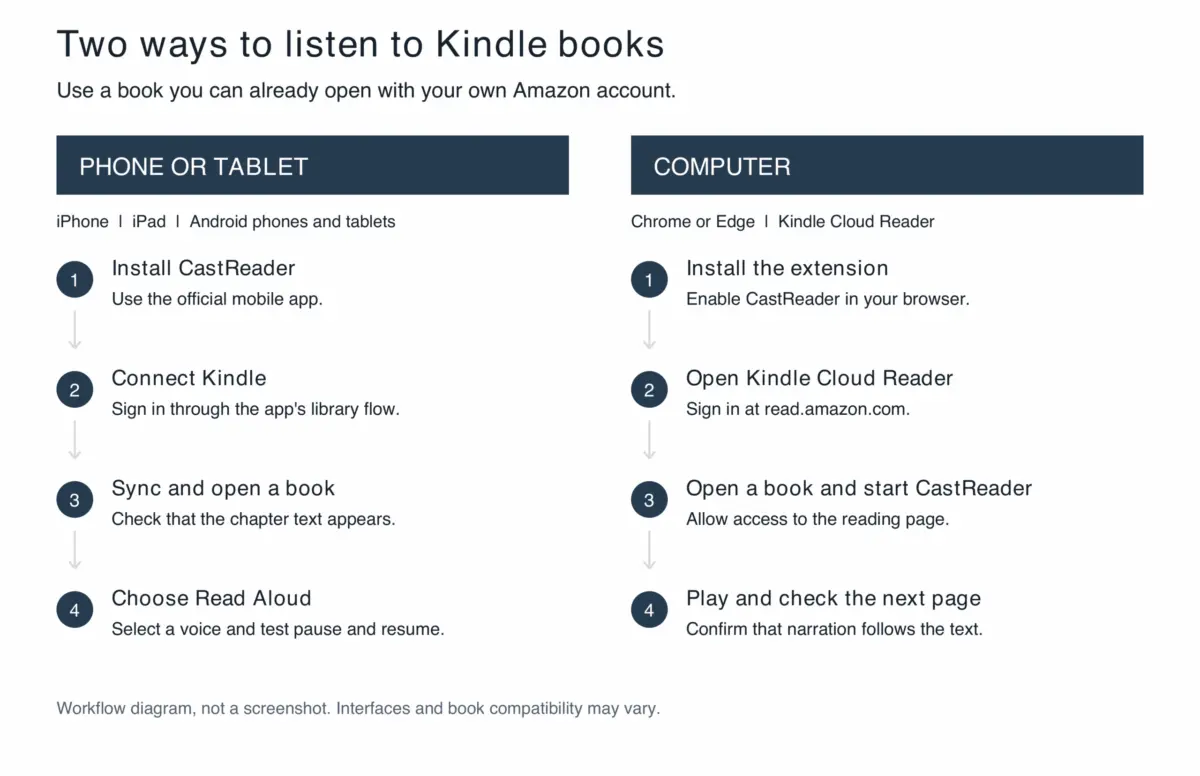
Setting up a robust listening routine requires distinct workflows depending on whether you are using a mobile device (iOS/Android) or a desktop computer via Kindle Cloud Reader.
+-----------------------------------------------------------------+
|                    CHOOSE YOUR DEVICE ROUTE                     |
+---------------------------------+-------------------------------+
                                  |
         +------------------------+------------------------+
         |                                                 |
         v                                                 v
  [ MOBILE DEVICE ]                                 [ DESKTOP COMPUTER ]
  • iOS / iPadOS / Android                          • Chrome / Edge Browser
  • Install CastReader App                          • Install Browser Extension
  • Connect Kindle Account                          • Open Kindle Cloud Reader
  • Sync Bookshelf                                  • Launch Extension & Play
         |                                                 |
         +------------------------+------------------------+
                                  |
                                  v
                   [ ENJOY CONTINUOUS LISTENING ]
Route A: Connecting Your Kindle Bookshelf on a Phone or Tablet
- Application Installation: Navigate to the official CastReader mobile app portal or your device’s native app store (Apple App Store or Google Play Store). Download and install the application, ensuring you accept any necessary permissions for background audio playback.
- Account Integration: Open the app and locate the integration settings. Find Kindle among the supported reading services or bookshelf import options. Follow the on-screen authentication prompts to link your Amazon reading account. Note: This process securely synchronizes your existing reading access and library metadata; it does not grant external parties access to your personal library.
- Library Synchronization & Title Selection: Once the bookshelf populates, select a title you wish to read. Do not rely solely on the visual appearance of the book cover; open the title and verify that the interior text—specifically your intended starting chapter—renders correctly within the application interface.
- Initiating Narration: Select the "Read Aloud" function. Choose a voice that suits your listening preference and set the playback speed to a comfortable, conversational baseline (typically 1.0x to 1.25x) before scaling up. Modern apps feature synchronized text highlighting and automatic scrolling, allowing you to easily locate your place if you glance back at the screen.
- Testing Background and Lock Screen Controls: Before embarking on a multi-hour listening session, test the application’s stability. Lock your phone screen, minimize the app to answer a notification, or switch network connections. Confirm that background playback resumes seamlessly. Additionally, configure the built-in sleep timer if you intend to use the app for bedtime listening, preventing playback from continuing hours after you have fallen asleep.
Route B: Listening via Kindle Cloud Reader on a Desktop Computer
- Browser Extension Deployment: Access the official browser extension directory for Google Chrome or Microsoft Edge via the designated CastReader desktop integration guide. Install the extension and ensure it is pinned, enabled, and granted permission to operate on designated reading domains.
- Accessing Kindle Cloud Reader: Open a new browser tab, navigate to
read.amazon.com, and sign in to your personal Amazon account. Open a book you have permission to read and wait for the body text to fully render on the screen. Resolve any loading or authentication errors with the web reader before attempting to initialize audio narration. - Activating the Narration Workflow: Launch the CastReader extension or use the embedded reading control interface on the webpage. Select your desired synthetic voice and initiate playback.
- Monitoring Page Transitions: Pay close attention to the first few page transitions. Because desktop web readers rely on dynamic pagination, automated TTS extensions must accurately capture visible text blocks and transition smoothly to the next DOM (Document Object Model) element. If you notice repeated sentences or skipped paragraphs, pause playback, manually navigate to a clean starting point in the text, and resume.
Advanced Features, Offline Modes, and Troubleshooting
Mastering the Offline Experience
For travelers preparing for flights or areas with unreliable cellular connectivity, offline listening is a critical requirement.
- iOS Implementation: Current iOS release notes indicate that users can save a Kindle book directly through the player’s "More" menu, locate the cached file under "Offline Books" in the application settings, and utilize local system voices for offline narration.
- Limitations: Users must understand that cloud-based neural AI voices and advanced server-side features (such as AI Explain) do not function without an active internet connection. Furthermore, equivalent robust offline caching may not mirror across Android or desktop environments. Always test an offline session with your network disabled before relying on it during travel.
Comprehension and Hybrid Reading Habits
Text-to-speech is a powerful tool, but it changes how we interact with complex text.
- Nonfiction and Dense Prose: When listening to dense nonfiction, utilize features like AI Explain (where supported by your subscription tier) to parse difficult arguments. However, remember that AI explanations reorganize material; they are not direct substitutes for complete original text quotations.
- Visual Elements: Maps, architectural diagrams, mathematical equations, poetry, and extensive footnotes cannot be adequately communicated by a linear audio stream. When encountering these elements, develop the habit of switching back to the visual screen. A balanced routine—alternating between looking and listening—ensures maximum comprehension without sacrificing mobility.
Systematic Troubleshooting Guide
| Issue Encountered | Probable Root Cause | Corrective Action |
|---|---|---|
| A specific book is missing from the synced library. | Account mismatch or authentication token expiration. | Verify that you are logged into the correct Amazon account. Use the manual refresh or re-authentication option within the app settings. |
| The book opens, but narration refuses to start. | Body text has not fully rendered in the DOM, or network latency is blocking the TTS engine. | Wait for all text elements to load completely. Check internet connectivity and ensure the selected voice package is downloaded. For desktop, verify browser extension permissions. |
| Playback freezes, stutters, or repeats lines after a page turn. | Desynchronization between the visual pagination engine and the audio buffer. | Pause playback, manually scroll to a clear paragraph break in the source text, and restart the narration. Check for pending app or extension updates. |
| Unfamiliar names or foreign words sound completely incorrect. | Synthetic phonetic misinterpretation of uncommon proper nouns. | Experiment with alternative voice models or adjust playback speed. If pronunciation critically impedes understanding, look directly at the text on the screen. |
Future Outlook and Subscription Economics
As text-to-speech technology continues to converge with generative artificial intelligence, the boundaries between reading and listening will continue to blur. Readers are no longer forced to choose between the physical constraints of a book and the financial barriers of dedicated audiobook stores.
Understanding the Cost Structure
Platforms like CastReader generally operate on a freemium model. A limited daily allowance is typically provided free of charge, allowing users to test core functionalities with their own libraries. For heavy users, Pro tiers unlock expanded access to high-fidelity standard narration and advanced AI comprehension tools. Current standard web pricing sits at approximately $4.99 monthly or $35.99 billed annually (though regional taxes and app store pricing variations may apply).
Readers must remember that subscription fees cover the software integration and speech synthesis infrastructure—they do not replace the purchase price or licensing rights of the underlying books.
The Road Ahead
Looking forward, we can anticipate even tighter integration between e-reading clients and neural audio engines, with improvements in real-time pronunciation dictionaries, emotional inflection mapping, and cross-device bookmark synchronization. By integrating tools that respect existing digital libraries while offering flexible listening routes, the modern reader is empowered to reclaim lost hours of the day—transforming mundane chores and commutes into seamless continuations of their literary adventures.



Comments
Facebook App ID not configured. Please add it in the Customizer.