
By Michael Kozlowski
Published by Good e-Reader
Executive Overview
The release of the latest generation of Amazon Kindle devices always sends a ripple of excitement through the digital reading community. Promising sleeker profiles, enhanced durability, and refined displays, the 2026 Kindle model—available in both premium aluminum and classic plastic finishes—was engineered to set a new benchmark for consumer e-readers. Featuring a modern flush bezel and an added protective glass layer, the device represents an aesthetic and structural leap forward for the product line.
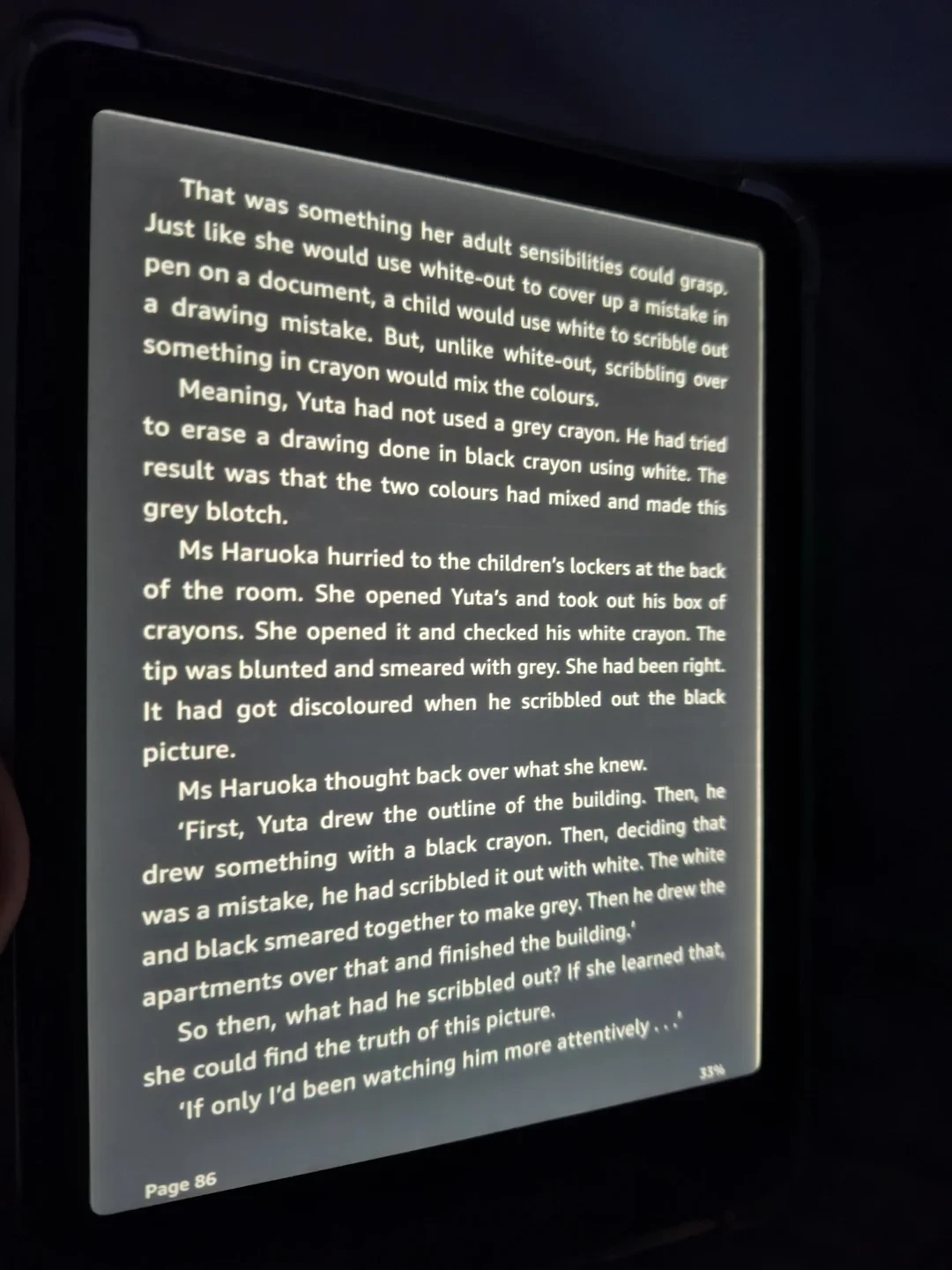
However, this sophisticated redesign has brought an unexpected hardware complication. Shortly after the rollout, early adopters and avid readers across online forums began reporting a frustrating visual anomaly: a faint dark line, or in more severe cases, an intrusive side-LED light bleed running along the bezel edges whenever the device’s internal front light is illuminated.
Read Also
While minor panel inconsistencies are historically common across various e-paper displays, the prominent light bleeding reported on these new units—particularly noticeable when reading in Dark Mode—has been officially classified as a manufacturing defect. Amazon has acknowledged the issue, pointing toward the complexities of the e-reader’s new structural assembly and the precision required to layer the touchscreen components beneath the front-lit display.
For consumers who have invested in the 2026 Kindle, this report offers a comprehensive breakdown of the hardware flaw, the root causes behind the manufacturing batches, Amazon’s official stance, and step-by-step instructions on how to secure a hassle-free device replacement.
Detailed Chronology of the 2026 Kindle Hardware Issue
The Launch and Early Adopter Enthusiasm
The 2026 Kindle refresh arrived with high market expectations. By introducing a flush-front design encased in options of lightweight plastic and rigid aluminum, Amazon aimed to bridge the gap between mid-tier e-readers and luxury devices like the Kindle Oasis or Paperwhite Signature Edition. The protective glass layer over the E Ink panel promised greater scratch resistance and a smoother, tablet-like tactile experience.
The Discovery of Edge Artifacts
Within days of the first wave of shipments reaching consumers, complaints began to trickle onto Reddit, MobileRead, and the Good e-Reader forums. Users noticed that under specific lighting conditions—most notably in dim environments with the front light turned up—a faint, linear shadow or a disruptive band of light would trace the inner perimeter of the bezel.
Initially, many consumers dismissed the artifact as a standard byproduct of front-lit E Ink screens. Historically, Light Emitting Diodes (LEDs) positioned along the bottom frame of an e-reader must diffuse light evenly across the entire matrix via a specialized light guide film. Minor variations near the light source have always existed within acceptable manufacturing tolerances. However, as more units arrived in consumers’ hands, it became clear that this was not a minor quirk, but a widespread production defect tied directly to the new flush-bezel architecture.
Escalation and the Shift to Dark Mode Complaints
The issue gained mainstream attention with the growing popularity of system-wide Dark Mode. When reading white text on a deep black background, any stray light bleeding from the edges of the bezel becomes glaringly obvious. Users who preferred nighttime reading found the side-LED light lines distracting, prompting an influx of return requests and customer service inquiries.
By mid-October 2026, tech reviewers and industry analysts began investigating the scale of the issue, forcing Amazon’s quality assurance teams to re-examine current production lines across all colorways of the base Kindle model.
Supporting Context & Metrics: Understanding Flush-Front Engineering
To understand why the 2026 Kindle is experiencing this defect, one must look at the physics and manufacturing processes behind modern e-paper displays.
The Evolution of E-Reader Fronts
For over a decade, traditional e-readers featured a recessed screen. The plastic bezels surrounding the display sat higher than the E Ink panel itself. While this design created a noticeable lip that could trap dust, it served a vital engineering purpose: it created a physical buffer between the LED light guide, the touchscreen grid, and the outer casing.

In recent years, consumer demand shifted toward flush-front aesthetics. A flush bezel means the protective glass layer, the capacitive touch sensor, the light guide film, and the E Ink Carta panel must be optically bonded together into a single, cohesive module.
The Anatomy of the Defect
Manufacturing a flush-front display requires absolute precision. Even microscopic misalignments during the optical lamination process can alter how light propagates through the light guide layer.
- Light Guide Displacement: If the LED array at the base of the screen is shifted by even a fraction of a millimeter relative to the light guide film, the light fails to disperse uniformly. Instead of fading smoothly across the page, concentrated light leaks directly into the bezel housing, creating the side-LED line.
- Adhesive Pooling: The bonding adhesive used to secure the protective glass layer can occasionally pool near the edges during thermal pressing, altering the refractive index of the light and casting dark, linear shadows.
- Tolerance Stack-Up: Because the 2026 model is manufactured in both plastic and aluminum chassis variants, differing thermal expansion rates during assembly may cause slight warping of the internal frame, pinching the display panel and creating pressure points that manifest as light bleed.
Official Statements and Industry Response
Amazon has moved quickly to address the consumer backlash, confirming that a subset of current batches for the base 2026 Kindle—spanning all available color options—was impacted by assembly inconsistencies.
In a statement addressing the hardware defect, company representatives clarified the threshold between normal e-reader lighting behavior and actionable hardware faults:
"While minor edge shadows or side-lighting variations can happen on flush-front e-readers, prominent light bleeding (especially in dark mode) is often considered a defect. Users experiencing severe light bleed on new units are typically advised to exchange the device."
This official acknowledgment is a welcome relief for consumers. Rather than forcing users to adapt to a compromised reading experience, Amazon’s warranty and support divisions have been briefed to streamline the replacement process for anyone impacted by the structural flaw.
Future Outlook: What This Means for Kindle Buyers
As consumer electronics lean heavier into sleek, zero-edge designs, manufacturing hurdles like the 2026 Kindle light bleed issue serve as a reminder of the physical limitations of micro-assembly.
Supply Chain Adjustments
Industry insiders indicate that Amazon has already instructed its manufacturing partners in Asia to recalibrate the optical bonding machinery and tighten quality control tolerances for subsequent production runs. Newer batches rolling off the assembly lines in late 2026 and early 2027 are expected to feature reinforced internal framing to prevent light guide shifting.
Advice for Current and Prospective Buyers
- If you already own a 2026 Kindle: Inspect your device in a dark room with the front light set to medium-high and Dark Mode enabled. If you see prominent light bleeding or sharp, distracting dark lines along the bezel, do not attempt to fix it yourself. This is strictly a hardware defect that software updates cannot resolve.
- If you are planning to buy: Retailers and Amazon warehouses are actively clearing out early inventory. If you receive a unit with light bleed defects, utilize Amazon’s straightforward return policy to exchange it for a revised batch unit.
How to Claim Your Replacement Kindle
If you are experiencing severe light bleed or side-LED lines on your 2026 Kindle, getting a replacement is a straightforward procedure. Amazon’s customer support network is well-prepared to handle these warranty claims.
Step 1: Contact Amazon Support
You have two primary methods to initiate your warranty claim:
- Live Chat (Recommended): Log into your Amazon account, navigate to the Help section, and open a live chat with an online support agent. Provide them with your order number and briefly explain that your new 2026 Kindle suffers from a confirmed hardware defect involving severe front-light bleeding. Many users note that Amazon’s automated or representative-led system often authorizes an advance replacement, shipping your new device before you are required to mail back the defective unit.
- Phone Support: If you prefer speaking to someone directly, you can contact the dedicated Kindle Warranty Support team at 866-321-8851.
Step 2: Seamless Data Migration
One of the greatest advantages of the Kindle ecosystem is cloud synchronization. When your replacement device arrives, you do not need to worry about losing your personal library, reading progress, or bookmarks.
Simply sign in to the new Kindle using your existing Amazon email address and password. The device will automatically sync your account, restoring all previously purchased Kindle books, documents, and collections directly to your new, defect-free screen. Ensure you package and return your original defective unit using the prepaid shipping label provided by Amazon within the specified timeframe to avoid any secondary charges.




Comments
Facebook App ID not configured. Please add it in the Customizer.