
Executive Overview
In a significant software expansion that bridges the gap between dedicated e-ink hardware and general-purpose mobile operating systems, Amazon has rolled out comprehensive handwriting and stylus support for the Kindle app on Android. Long confined to specialized devices like the Kindle Scribe or physical notebooks, the ability to jot down marginalia, sketch diagrams, and create active canvas notes has officially arrived on mainstream Android tablets and smartphones.
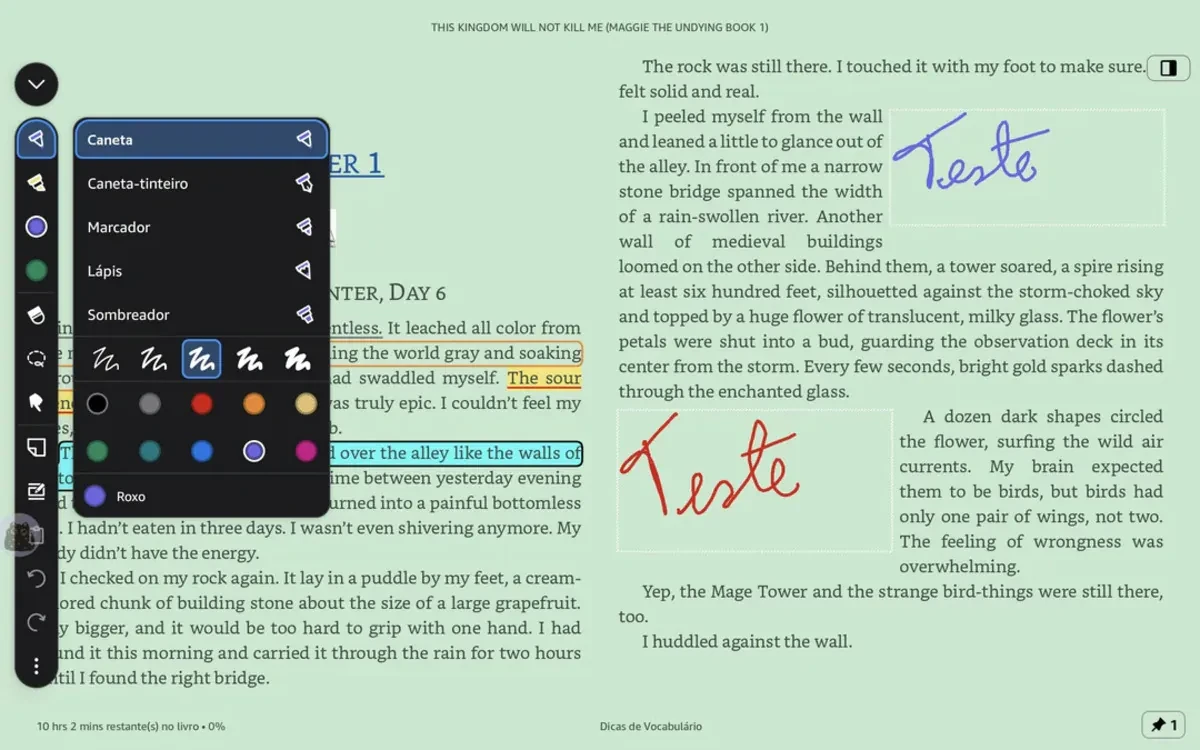
This update introduces a sophisticated vertical toolbar equipped with pen tools, allowing users of compatible devices—such as Samsung’s Galaxy Tab lineup and Onyx Boox e-paper tablets—to write directly over electronic pages. Notably, the software incorporates dynamic text-reflow algorithms similar to those seen on Amazon’s flagship note-taking e-reader. As users write, digital text automatically shifts to accommodate handwritten notes and sticky notes, preventing obstructions and maintaining a clean, readable layout.
While the feature has been met with immediate enthusiasm from the Android productivity community, its initial rollout highlights a persistent platform divide. Apple users, particularly those utilizing the iPad and Apple Pencil ecosystem, are currently left out of the update cycle, with no official timeline provided for iOS or iPadOS integration. This comprehensive report examines the technical mechanics of Amazon’s new Android features, evaluates early user reception, analyzes the strategic implications for the digital reading market, and projects the future trajectory of cross-platform annotation tools.
Read Also
Detailed Chronology: Bridging the App-Hardware Divide
To understand the significance of Amazon’s latest Android update, one must examine the historical friction between dedicated reading hardware and software applications. For over a decade, the Kindle application ecosystem prioritized digital text rendering, highlighting, and typed marginalia. While users could type notes on mobile screens using virtual keyboards, the physical act of handwriting—widely recognized by cognitive scientists as a superior method for retention and deep comprehension—remained strictly out of reach for app-based readers.
The turning point in Amazon’s annotation strategy arrived with the launch of the Kindle Scribe, the company’s first dedicated e-ink device featuring a stylus. The Scribe introduced "active canvas" technology, which anchors handwritten notes directly to specific words or lines within a book. As text size or font spacing changes, the handwritten notes move dynamically with the content. However, this functionality was strictly siloed within the Scribe hardware ecosystem. Notes taken on a Scribe could sync to the cloud, but mobile and desktop Kindle apps treated them as static images or locked layers, preventing users on phones and tablets from interacting with them natively.
Throughout 2024 and 2025, Amazon incrementally laid the groundwork to dismantle these boundaries. Early updates introduced enhanced text underlining, custom color-coded outlines, and improved margin spacing on mobile applications. The silent precursor to the current release involved optimizing the Kindle rendering engine to process vector-based pen strokes on mobile GPUs.
The culmination of these background optimizations materialized in October 2026, when Amazon quietly pushed out a major client-side update for the Kindle Android app. Rather than restricting the feature to basic drawing overlays, the update enabled full stylus integration. Users on supported hardware could suddenly access a vertical toolbar housing various pen styles, line thicknesses, and color palettes. By bringing the core mechanics of the Kindle Scribe software engine to Android, Amazon effectively transformed high-end tablets into versatile digital notebooks, marrying the convenience of app-based libraries with the fluid ergonomics of physical writing instruments.
Supporting Context & Metrics: The Technical Architecture and Ecosystem Impact
The introduction of native stylus support within a mainstream reading application requires a complex interplay of software rendering, cloud synchronization, and hardware optimization. Unlike simple drawing apps that capture raster images over a blank canvas, the Kindle app must treat handwritten input as dynamic metadata tied to specific textual anchors.
Dynamic Text-Flow and Rendering Engines
When a user writes a note in the margins of a reflowable e-book, the Kindle app’s rendering engine executes several computational steps simultaneously:
- Stroke Capture: The application samples input coordinates from the active stylus (utilizing USI, Samsung S-Pen, or Wacom protocols depending on the device) at high polling rates to eliminate latency.
- Vector Conversion: Strokes are converted into lightweight vector paths rather than heavy bitmap images, ensuring infinite scalability without pixelation.
- Text Anchoring: The software calculates the nearest bounding box of rendered text and attaches the vector stroke coordinates to that specific paragraph or sentence.
- Reflow Adjustment: If the user changes the font size, line spacing, or screen orientation, the layout engine recalculates text positions and pushes or pulls the anchored handwritten notes accordingly, preventing overlaps or orphaned marginalia.
Cross-Device Compatibility Metrics
The rollout targets devices equipped with active digitizer layers. Hardware compatibility spans two primary categories:
- Consumer Android Tablets: Devices such as the Samsung Galaxy Tab S series, which feature low-latency S-Pen integration, offer an optimal experience matching the responsiveness of dedicated e-readers.
- Android-Based E-Paper Devices: E-ink tablets manufactured by brands like Onyx Boox, Meebook, and Bigme—which run customized versions of Android—benefit immensely from the update. Historically, these devices relied on third-party note-taking apps or proprietary reading software; integrating native Kindle stylus support allows users to annotate Amazon purchases directly within the ecosystem without exporting files to external PDF readers.
Despite these technological strides, the omission of Apple devices remains a glaring disparity. iPadOS currently commands a massive share of the tablet productivity market, supported by the low-latency Apple Pencil. Industry analysts suggest that Amazon’s decision to prioritize Android stems from the operating system’s fragmented yet highly customizable graphics APIs, or perhaps a phased rollout strategy designed to test server-side cloud sync loads before scaling to Apple’s massive user base.

Official Statements and Early User Reception
While Amazon has historically maintained a quiet posture regarding minor application updates, relying instead on release notes and automatic app store updates, the reception from the digital reading community has been vocal and immediate.
Early adopters and power users across productivity forums, Reddit communities, and tech blogs have lauded the update as a watershed moment for digital studying. One prominent reviewer noted that the ability to seamlessly review, annotate, and color-code textbooks and professional documents on an Android tablet eliminates the need to carry both a physical notebook and an e-reader.
"For years, mobile reading apps treated the screen as a glass wall—you could look through it and highlight what was already there, but you couldn’t leave your own mark," noted one software engineer and avid Kindle user in a widely shared forum breakdown. "By allowing fluid handwriting side-by-side with typed highlights, Amazon has finally closed the frustrating gap between mobile apps and dedicated hardware."
Educators and students have similarly praised the color-coding capabilities. The inclusion of multiple pen styles, sizes, and color palettes allows users to categorize their annotations—using blue for definitions, yellow for questions, and red for critical takeaways—directly mirroring physical annotation strategies long used in paper textbooks.
However, user feedback has not been without constructive critique. Some users on lower-end Android phones without active stylus support have reported that capacitive stylus inputs lack the palm-rejection accuracy found on dedicated tablets, leading to accidental marks when resting a hand near the screen. Additionally, early testers running the app on older Onyx Boox firmware versions noted minor latency spikes during heavy PDF rendering, suggesting that optimal performance requires recent hardware specifications and up-to-date operating system patches.
Future Outlook: The Evolution of Digital Marginalia
Amazon’s integration of handwriting support into the Kindle Android app signals a broader shift in how reading software interacts with human cognition. As screens become more responsive and processing power on mobile devices increases, the historical divide between "reading" apps and "writing" apps is rapidly dissolving.
Looking ahead, several key developments are expected to shape the landscape of digital annotation:
1. Inevitable iOS and iPadOS Expansion
Given the dominant market share of Apple’s iPad in the academic and professional sectors, industry observers consider it mathematically and commercially improbable that Amazon will keep this feature exclusive to Android indefinitely. Once the backend cloud-sync architecture stabilizes under Android’s initial load, development resources are widely expected to pivot toward iPadOS integration, bringing Apple Pencil support to the ecosystem.
2. AI-Powered Handwriting Search and Summarization
With the foundational vector data for handwritten notes now living within the Kindle cloud ecosystem, the stage is set for advanced artificial intelligence integration. Future updates could introduce Optical Character Recognition (OCR) for handwritten marginalia, allowing users to search their own handwritten notes across thousands of books using text queries. Furthermore, machine learning models could synthesize handwritten notes into chapter summaries, flashcards, or study guides automatically.
3. Redefining the Textbook and Manga Experience
The inclusion of color-coded pen styles opens new avenues for graphic novel, comic, and manga enthusiasts. Unlike e-ink devices—which remain predominantly monochrome—color Android tablets allow users to interact directly with colorful artwork, sketching notes, dialogue translations, or artistic critiques directly onto digital panels without altering the underlying source file.
As digital reading continues to evolve past static text display into an interactive, highly personalized dialogue between author and reader, Amazon’s move firmly establishes that the future of books is not merely digital—it is deeply, fluidly writable.


Comments
Facebook App ID not configured. Please add it in the Customizer.