
Executive Overview
For decades, the Stanford Encyclopedia of Philosophy (SEP) has stood as the gold standard of online academic reference materials. Maintained by Stanford University, this peer-reviewed, dynamically updated compendium serves as an indispensable resource for professional philosophers, graduate students, undergraduate researchers, and curious minds worldwide. Yet, despite its unmatched academic rigor and editorial excellence, the platform’s user interface and digital architecture have long reflected their origins in an earlier era of the internet. Navigating dense philosophical tracts on the native site often meant confronting dense walls of text, static outlines, and limited accessibility features.
Enter Andrew Shen—a product designer at Notion and holder of an MA in philosophy—who has spent the better part of the last half-decade quietly revolutionizing how scholars interact with this foundational text. Five years after the initial rollout of his popular browser extension, SEP+, Shen has released its major successor: SEP+ v2.
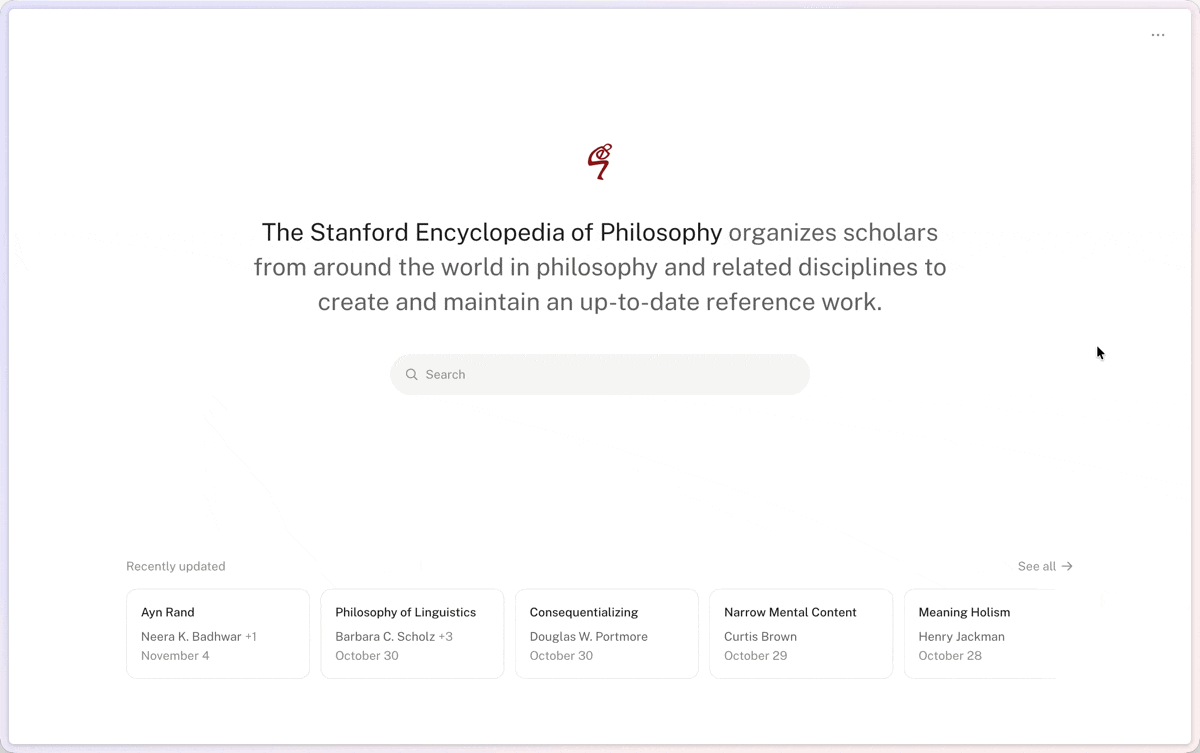
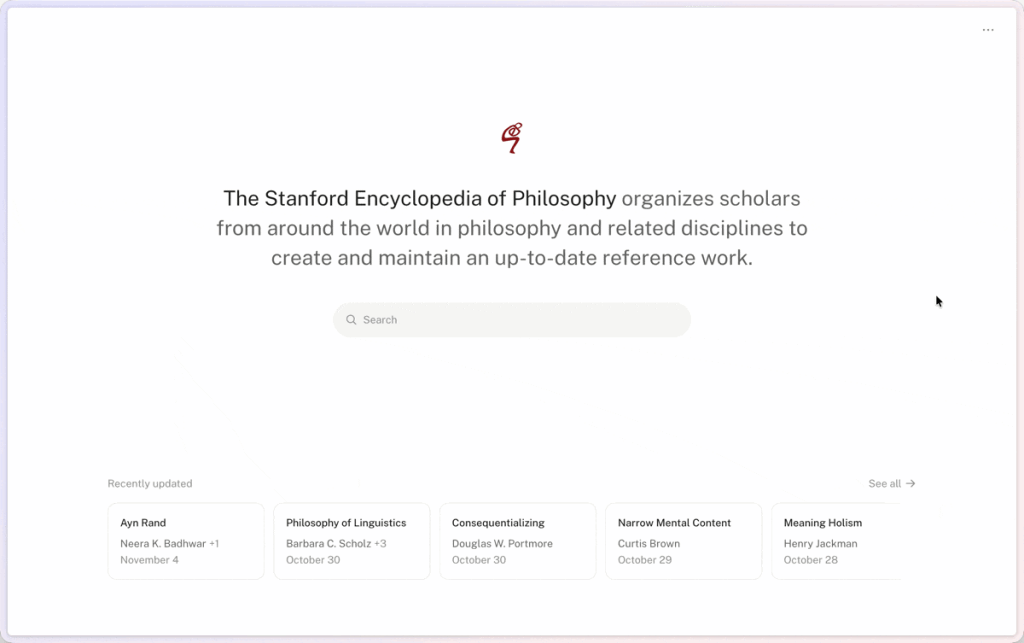
This comprehensive update preserves the core mission of the original extension while dramatically expanding its capabilities. SEP+ v2 introduces a completely overhauled user interface, streamlined navigation paradigms, and modern productivity tools—such as a developer-grade "command palette"—all while strictly maintaining user privacy through a zero-data-collection policy. Designed to bridge the gap between world-class philosophical scholarship and cutting-edge user experience (UX) design, SEP+ v2 is poised to transform daily academic workflows across the global philosophical community.
Read Also
Detailed Chronology: From Concept to the Launch of Version 2
The Genesis of SEP+: 2021
The story of SEP+ begins with a common frustration familiar to anyone who has spent hours reading academic papers online. In late 2021, Andrew Shen recognized that while the content hosted on plato.stanford.edu was peerless, the digital medium through which it was delivered created unnecessary cognitive friction. Long-form philosophical arguments demand intense concentration; minor distractions, such as cumbersome navigation outlines or poorly optimized typography, can impede comprehension.
Drawing upon his dual background in philosophy and professional product design, Shen developed the first iteration of SEP+. Released to immediate acclaim within academic circles, the original extension introduced targeted, high-impact fixes:
- Relocated Navigation: Moving article outlines from a disjointed top-of-page placement to a persistent sidebar, allowing readers to jump between sections seamlessly.
- Dark Mode Integration: Offering a system-friendly dark mode to reduce eye strain during late-night research sessions.
- Enhanced Typography: Tweaking font rendering, line heights, and margins to optimize readability for dense academic prose.
- Print Optimization: Automatically stripping out extraneous navigation elements and sidebars when users attempted to print or export articles to PDF.
- Keyboard Shortcuts: Implementing quick-search shortcuts to accelerate literature reviews.
The reception was overwhelmingly positive, proving that even minor structural interventions could vastly improve the digital reading experience of complex academic literature.
The Five-Year Gap and the Imperative for V2
In the years following the release of the original extension, the broader landscape of digital software evolved at a breakneck pace. Modern web applications increasingly prioritized lightning-fast navigation, minimalist design aesthetics, and keyboard-centric workflows (popularized by developer tools and productivity apps like Notion and Obsidian).
Meanwhile, the core SEP site remained functionally stable but visually dated. Recognizing an opportunity to push the boundaries of what an academic browser extension could achieve, Shen began developing a comprehensive architectural overhaul. Rather than merely patching the existing codebase, he reimagined the extension from the ground up to create a unified, modern workspace environment directly inside the browser.
The Launch of SEP+ v2
Released in late 2024, SEP+ v2 represents a quantum leap forward. The update goes beyond minor cosmetic tweaks, delivering a full-scale redesign of the primary touchpoints users encounter daily: the home page, individual article views, and the search interface. Most notably, the introduction of a universal "command palette" brings desktop-class speed and fluidity to philosophical research, cementing the extension’s status as an essential digital utility for modern academics.
Supporting Context & Metrics: The Intersection of UX Design and Academic Research
The Cognitive Burden of Digital Reading
To understand the significance of SEP+ v2, one must examine the unique demands of reading philosophy online. Unlike narrative journalism or fast-paced media, philosophical texts require rigorous parsing of logical arguments, careful tracking of historical contexts, and frequent cross-referencing between distinct encyclopedia entries.
When digital interfaces introduce friction—such as forcing users to scroll back to the top of a 10,000-word article merely to check the table of contents—it fractures "deep work" and diminishes working memory. By moving navigational elements into a persistent, non-intrusive sidebar, SEP+ directly addresses cognitive load theory, minimizing extraneous visual stimuli so researchers can focus entirely on conceptual analysis.
Technical Architecture and Privacy Guarantees
In an era defined by aggressive corporate data harvesting, intrusive telemetry, and ad-driven monetization models, SEP+ v2 stands out for its uncompromising commitment to user privacy. Andrew Shen has structured the extension with an austere, privacy-first technical footprint:
- Zero Data Collection: The extension tracks no user metrics, records no search queries, and builds no behavioral profiles.
- No Advertisements: Completely free of charge and free of commercial interruptions.
- Sandboxed Permissions: SEP+ operates on a principle of radical minimalism, requesting access exclusively to
plato.stanford.edu. It cannot read, monitor, or interact with any other tab or website visited by the user.
This ethical design framework has earned the extension profound trust within academic institutions, where data privacy is paramount.
Official Statements and Architectural Breakdown
Key Features of the V2 Ecosystem
In breaking down the engineering and design choices behind SEP+ v2, several core components stand out as major advancements over its predecessor:
- The Command Palette: Inspired by advanced code editors and productivity suites, the new command palette enables users to tap a simple keystroke to summon a search overlay. From here, researchers can instantly search the entire SEP database, execute complex queries, and jump directly to specific entries without ever touching their mouse.
- Redesigned Home and Search Pages: The visual hierarchy of the homepage and search results has been thoroughly modernized. Cluttered layouts have been replaced with clean, airy typography and purposeful whitespace, making exploratory research vastly more inviting.
- Refined Typography and Dark Mode 2.0: Building upon the success of the original dark mode, v2 features finely tuned contrast ratios and adaptive color palettes that ensure seamless transitions between day and night reading environments. Typography has been recalibrated to ensure optimal character-per-line counts, reducing visual fatigue during prolonged study sessions.
- Preserved Core Utilities: All beloved features from the original release—such as print-cleanup algorithms and lightning-fast sidebar navigation—remain fully intact and optimized for modern web standards.
The Designer’s Vision
Reflecting on the philosophy guiding his work, Andrew Shen emphasizes that good design should be felt through its absence. By fading into the background, SEP+ allows the profound insights of historical and contemporary philosophers to take center stage.
"As before, it’s free, collects no user data, serves no ads, and only has access to plato.stanford.edu."
— Andrew Shen, Creator of SEP+
By combining rigorous academic empathy with elite commercial product design expertise (honed during his tenure at Notion), Shen has successfully bridged two worlds that rarely intersect: high-level academic publishing and modern consumer-grade software engineering.
Future Outlook: The Next Frontier for Digital Scholarship
The success of SEP+ v2 highlights a broader, ongoing transformation within academic research: the democratization of digital tooling. For centuries, scholars were entirely at the mercy of institutional software budgets and university webmasters when it came to their digital environments. Today, browser extensions, user scripts, and independent developer projects are empowering individuals to customize their academic workflows to an unprecedented degree.
As digital repositories like the Stanford Encyclopedia of Philosophy continue to expand in volume and complexity, tools like SEP+ will become increasingly vital. Looking ahead, one can anticipate further integrations—potentially leveraging lightweight client-side machine learning for advanced text summarization, citation graph visualizations, or automated cross-referencing between related encyclopedia entries.
For now, however, SEP+ v2 represents an immediate, frictionless upgrade for anyone who reads, writes, or studies philosophy.
Availability and Installation
SEP+ v2 is available completely free of charge and requires no complex configuration. Once installed, the extension operates automatically whenever a user visits the standard SEP website (plato.stanford.edu).
- Google Chrome Users: Download and install the extension via the Chrome Web Store.
- Mozilla Firefox Users: Download and install the extension via the Firefox Add-ons Repository.
Whether you are an undergraduate tackling your first metaphysics paper or a tenured professor conducting deep historical research, SEP+ v2 offers an indispensable refinement to the digital home of contemporary philosophy.



Comments
Facebook App ID not configured. Please add it in the Customizer.