
Executive Overview
Amazon has officially deployed a transformative software update to the Kindle application for Android, introducing native handwriting and active stylus support. This strategic move effectively bridges the feature gap between Amazon’s dedicated hardware ecosystem—most notably the Kindle Scribe—and mainstream mobile operating systems.
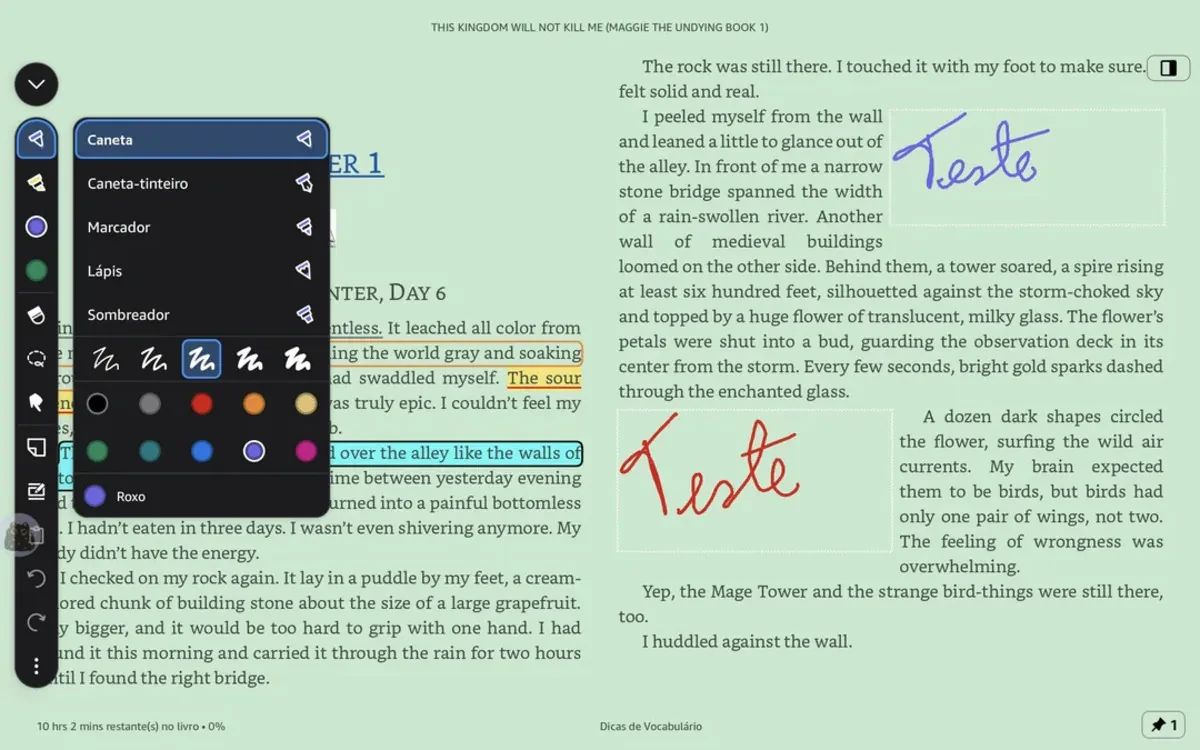
Historically, digital annotating on the Kindle app was restricted to standard typed notes, color-coded highlights, and basic digital bookmarks. With this latest update, users of supported Android tablets and smartphones (such as Samsung’s Galaxy Tab series and Onyx Boox E-Ink devices) can now write handwritten notes, drop sticky notes directly onto pages, and utilize active canvas journaling features.
Crucially, the software incorporates text-flow mechanics identical to those found on Amazon’s premium e-paper devices. When a user scribbles a handwritten note or margin comment, the surrounding digital text dynamically flows around the annotation. Furthermore, the update introduces a robust suite of customization options, allowing readers to toggle between different pen styles, varying stroke sizes, and an array of vibrant colors.
Read Also
While the feature has been met with widespread acclaim from productivity enthusiasts and avid readers alike, its initial rollout remains strictly partitioned. Android users are currently enjoying an exclusive preview of advanced mobile annotation, while Apple users utilizing iPads and iPhones await word of a corresponding iOS/iPadOS release. This report explores the mechanics of the new update, its technological implications, user response, and the broader future outlook for the digital reading market.
Detailed Chronology of the Update and Feature Rollout
The evolution of Amazon’s Kindle application from a static text-display medium into an interactive, multimedia-rich workspace has been a gradual, deliberate process. Understanding the significance of this Android-centric release requires a look back at how Amazon has systematically upgraded its software architecture across multiple platforms over the past few years.
The Rise of the Kindle Scribe and Software Parity
When Amazon launched the Kindle Scribe, it marketed the device primarily as a dual-purpose e-reader and digital notebook. Users praised the hardware for its large 10.3-inch 300 ppi display and the natural friction of its stylus. However, a persistent criticism from power users was the fragmented nature of the Kindle ecosystem. Notes made on a Kindle Scribe did not always sync fluidly or display intuitively across peripheral mobile apps, often appearing as static attachments rather than integrated annotations.
Over the last eighteen months, Amazon began laying the groundwork to resolve this fragmentation. Incremental updates introduced enhanced underlining tools, margin outlines, and improved cloud synchronization for highlights. Despite these updates, mobile apps remained fundamentally typing-centric. If an Android or iOS user wanted to write marginalia by hand, they were forced to rely on third-party PDF markup tools or switch exclusively to dedicated e-ink hardware.
The Android Deployment
The quiet rollout of the stylus and handwriting update to the Android ecosystem marks a definitive pivot in Amazon’s software strategy. Spotted by early adopters and tech analysts, the feature integrates a vertical toolbar on the left side of the reading interface. Tapping this toolbar reveals a comprehensive pen tool menu.
- Active Canvas and Sticky Notes: Users can pin handwritten sticky notes to specific paragraphs or open an active canvas workspace for broader brainstorming sessions tied to the text.
- Dynamic Text Reflow: Unlike basic drawing layers that simply paint over pixels, Amazon’s engine calculates the bounding box of the handwritten entry and pushes the surrounding book text downward or outward, maintaining complete legibility.
- Hardware Compatibility: The update leverages standard Android stylus APIs (such as Samsung’s S-Pen integration), ensuring low-latency writing experiences on high-refresh-rate tablets, as well as specialized Android-powered E-Ink reading tablets like those from Onyx Boox.
Notably, as of this writing, Apple device owners have received no indication of when an iPadOS or iOS equivalent might launch, leaving iPad users—who possess some of the most capable styluses in the industry via the Apple Pencil—temporarily sidelined.
Supporting Context & Metrics: The Shift in Mobile Productivity
To fully comprehend why this feature matters, one must analyze the broader metrics of modern digital reading habits, consumer hardware adoption, and productivity trends.
The Convergence of Reading and Note-Taking
According to digital publishing analytics, a growing segment of the reading population—estimated at roughly 35% of non-fiction and academic e-book consumers—actively utilizes annotations for research, professional development, and creative writing. For years, these users faced a bifurcation in their digital workflows:
- Tablets and iPads: Offered brilliant multi-tasking and handwriting apps (like GoodNotes or Notability), but reading Kindle books often meant dealing with restrictive Digital Rights Management (DRM) and poorly integrated web-reader layouts.
- Dedicated E-Readers: Offered distraction-free reading and superior battery life, but lacked the robust processing power, color displays, and app ecosystems of modern Android slates.
By bringing fluid stylus support directly into the Kindle Android app, Amazon is capitalizing on the multi-device habits of modern consumers. Users no longer need to carry a dedicated notebook alongside a tablet; their entire library and sketchpad coexist within a single interface.
Color-Coding, Manga, and Comics
Another demographic benefiting enormously from this update is the comic book and manga reading community. Android tablets—particularly large-format OLED models from Samsung and Lenovo—have long been favored for digital graphic novel consumption due to their rich contrast and vibrant color reproduction.

With the introduction of color-customizable pen styles, sizes, and highlight options within the Kindle app, users can now color-code panels, translate phrases directly on the page with handwriting, or sketch reaction notes directly onto comic layouts. This transforms a traditionally passive media-consumption format into an interactive, creative canvas.
Official Statements and Early User Feedback
While Amazon has historically maintained a measured, quiet approach to minor software rollouts—often favoring staggered server-side updates over noisy press releases—the user community has been vocal in its assessment of the new capabilities.
Early User Reception and Productivity Praise
Within digital reading forums, Reddit communities, and tech blogs, the initial consensus has been overwhelmingly positive. Early adopters have heralded the update as a "massive productivity upgrade."
One prominent user review noted:
"Being able to pull out my Galaxy Tab, open up a dense historical non-fiction text, and scribble handwritten diagrams and margin notes without losing my place is a game-changer. It bridges the gap between physical paper margins and the cloud."
Power users have particularly praised the color-coding versatility. Medical students, legal professionals, and literature researchers who rely heavily on color-differentiated notes can now systematically organize their thoughts directly over Kindle text, streamlining their study sessions without needing to export files into external PDF editors.
Industry Implications and Competitor Pressure
Industry analysts view this move as a direct response to competing platforms like Google Play Books and various independent e-reading ecosystems that have flirted with advanced markup tools. By upgrading the Android app first, Amazon acknowledges the immense hardware diversity of the Android market—spanning everything from budget phones to high-end productivity slates and specialized E-Ink portables.
Future Outlook: What Lies Ahead for Digital Annotations
The integration of handwriting support into the Kindle Android app opens up a fascinating window into the future of digital literature and software development. Several key trends and questions emerge as we look toward the horizon:
1. The Inevitable iOS and iPadOS Rollout
Given Apple’s massive market share in the tablet space—and the popularity of the iPad and Apple Pencil among students and professionals—it is statistically improbable that Amazon will keep this feature exclusive to Android indefinitely. Industry watchers anticipate that the Android rollout serves as a testing ground for performance, cloud-sync reliability, and server-load management before Amazon scales the architecture to Apple’s operating systems.
2. AI Integration and Optical Character Recognition (OCR)
As handwriting becomes a native input method within the Kindle app, the next logical frontier is artificial intelligence integration. Imagine a future update where handwritten notes inside a Kindle book can be instantly searched via OCR, summarized by an AI assistant, or converted into typed text with a single tap. Amazon’s recent investments in generative AI and natural language processing make such features a distinct possibility for upcoming software cycles.
3. Cross-Device Cloud Synchronization
The ultimate promise of the Kindle ecosystem has always been seamless synchronization—stopping on your phone, picking up on your Kindle paperwhite, and finishing on your tablet. Ensuring that complex, vector-based handwritten notes and dynamic text-reflow annotations sync instantly and accurately across disparate operating systems will be Amazon’s most significant technical hurdle moving forward. If successful, it will cement the Kindle app as the gold standard for digital reading cross-compatibility.
Conclusion
Amazon’s integration of handwriting and stylus support into the Kindle Android app is far more than a minor quality-of-life patch; it is a fundamental evolution of how we interact with digital text. By successfully merging fluid handwriting, active canvas spaces, dynamic text reflow, and color-customizable tools onto mainstream mobile devices, Amazon has dismantled long-standing barriers between hardware-bound reading and software productivity.
While Apple users must exercise patience while awaiting their turn, Android and E-Ink tablet users now possess a powerful, unified tool for learning, creating, and reading. As this feature matures and inevitably expands across platforms, the line between reading a book and writing your own story within its margins continues to blur.


Comments
Facebook App ID not configured. Please add it in the Customizer.